Generate logos and images with consistent visual styles using Im
This n8n template allows you to use AI to generate logos or images which mimic visual styles of other logos or images. The model used to generate the images ...
🔌 Nodes & Integrations Used (7)
📖 Implementation & Setup Guide
This n8n template allows you to use AI to generate logos or images which mimic visual styles of other logos or images. The model used to generate the images is Google's Imagen 3.0.
With this template, users will be able to automate design and marketing tasks such as creating variants of existing designs, remixing existing assets to validate different styles and explore a range of designs which would have been otherwise too expensive and time-consming previously.
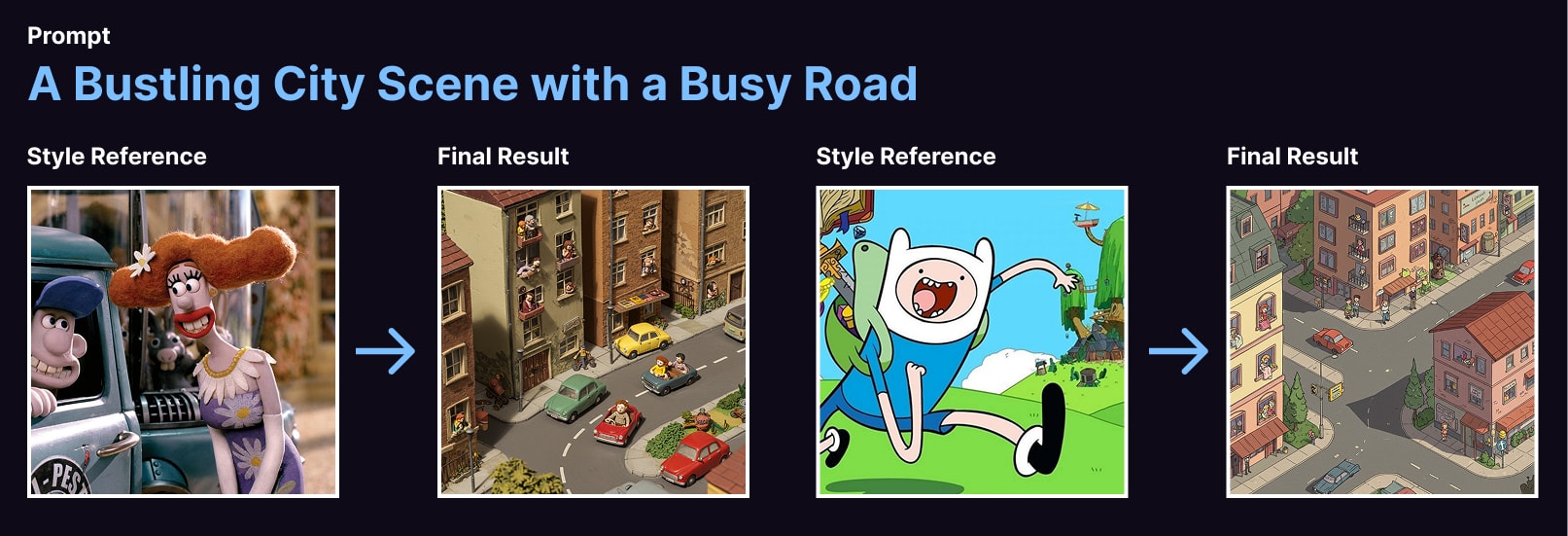
How it works * A form trigger is used to capture the source image to reference styles from and a prompt for the target image to generate. * The source image is passed to Gemini 2.0 to be analysed and its visual style and tone extracted as a detailed description. * This visual style description is then combined with the user's initial target image prompt. This final prompt is given to Imagen 3.0 to generate the images. * A quick webpage is put together with the generated images to present back to the user. * If the user provided an email address, a copy of this HTML page will be sent.
How to use * Ensure the workflow is live to share the form publicly. * The source image must be accessible to your n8n instance - either a public image of the internet or within your network. * For best results, select a source image which has strong visual identity as these will allow the LLM to better describe it. * For your prompt, refer to the imagen prompt guide found here: [https://ai.google.dev/gemini-api/docs/image-generation#imagen-prompt-guide](https://ai.google.dev/gemini-api/docs/image-generation#imagen-prompt-guide)
Requirements * Gemini for LLM and Imagen model. * Cloudinary for image CDN. * Gmail for email sending.
Customising this workflow * Feel free to swap any of these out for tools and services you prefer. * Want to fully automate? Switch the form trigger for a webhook trigger!
⚡ How to import this workflow into n8n:
- Click the Direct Download JSON button above to save
Generate_logos_and_images_with_consistent_visual_styles_using_Im.json. - Log in to your n8n Cloud or self-hosted n8n instance.
- In your workflow canvas, click the menu in top-right and select Import from File (or paste the JSON directly).
- Configure your credentials (e.g. API keys, database URLs) in the corresponding node settings.
- Click Execute Workflow to test and switch to Active!
Related Email & Outreach Workflows
View All in Email & Outreach →Abandoned cart recovery for Shopify via Gmail Google Sheets T
Who is this for? This template is ideal for solo store owners, eCommerce marketers, automation beginners, or anyone using Shopify and Gmail who wants to reco...
Add new leads in Lemlist from Airtable
This workflow allows you to add new leads in Lemlist from Airtable. !workflow-screenshot Airtable node: This node lists all the emails that are stored in you...
Add Subscriber and Send Email Campaign
Production-ready n8n automation template for Add Subscriber and Send Email Campaign built by AhiXLight. Seamlessly connects Sendy with 3 configured nodes.
Add new contacts from HubSpot to the email list in Mailchimp
This workflow adds new HubSpot contacts to the Mailchimp email list. Prerequisites - HubSpot account and HubSpot credentials - Mailchimp account and Mailchim...