{
  "workflow": {
    "id": 3954,
    "name": "Generate logos and images with consistent visual styles using Imagen 3.0",
    "views": 24381,
    "recentViews": 2,
    "totalViews": 24381,
    "createdAt": "2025-05-09T08:58:19.404Z",
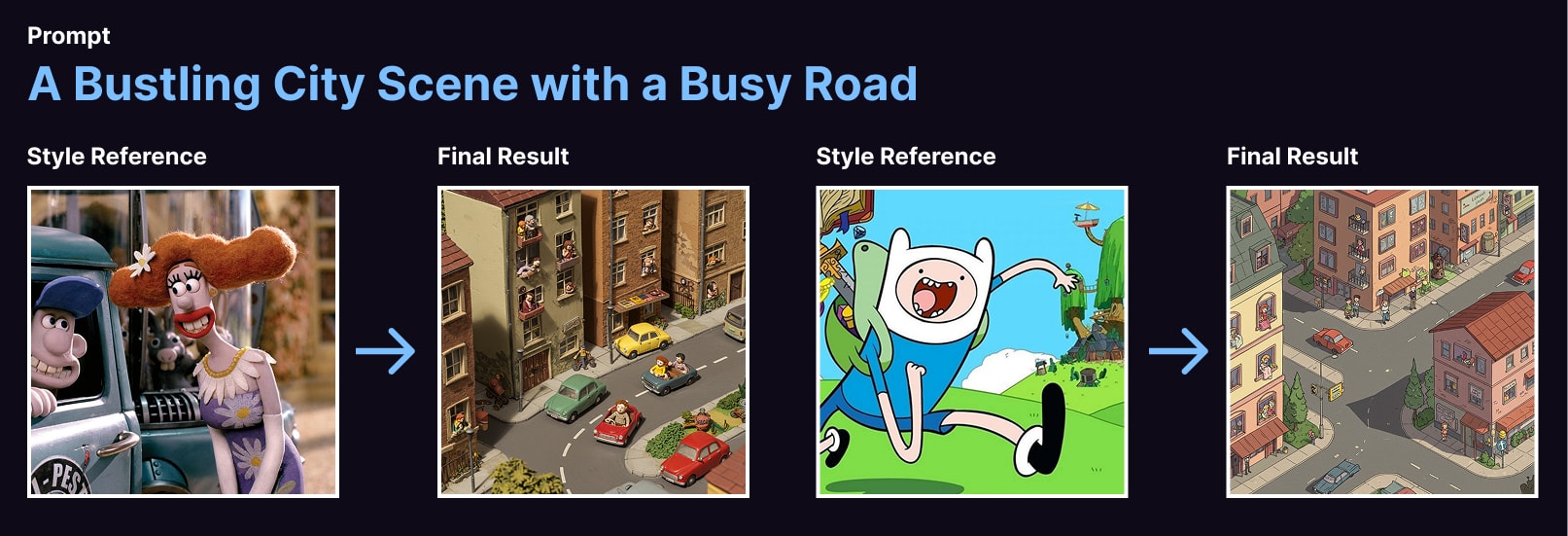
    "description": "### This n8n template allows you to use AI to generate logos or images which mimic visual styles of other logos or images. The model used to generate the images is Google's Imagen 3.0.\n\nWith this template, users will be able to automate design and marketing tasks such as creating variants of existing designs, remixing existing assets to validate different styles and explore a range of designs which would have been otherwise too expensive and time-consming previously.\n\n![banner](https://res.cloudinary.com/daglih2g8/image/upload/f_auto,q_auto/v1/n8n-workflows/vu8uyt2w5qheyetpqj7q)\n\n### How it works\n* A form trigger is used to capture the source image to reference styles from and a prompt for the target image to generate.\n* The source image is passed to Gemini 2.0 to be analysed and its visual style and tone extracted as a detailed description.\n* This visual style description is then combined with the user's initial target image prompt. This final prompt is given to Imagen 3.0 to generate the images.\n* A quick webpage is put together with the generated images to present back to the user.\n* If the user provided an email address, a copy of this HTML page will be sent.\n\n### How to use\n* Ensure the workflow is live to share the form publicly.\n* The source image must be accessible to your n8n instance - either a public image of the internet or within your network.\n* For best results, select a source image which has strong visual identity as these will allow the LLM to better describe it.\n* For your prompt, refer to the imagen prompt guide found here: [https://ai.google.dev/gemini-api/docs/image-generation#imagen-prompt-guide](https://ai.google.dev/gemini-api/docs/image-generation#imagen-prompt-guide)\n\n### Requirements\n* Gemini for LLM and Imagen model.\n* Cloudinary for image CDN.\n* Gmail for email sending.\n\n### Customising this workflow\n* Feel free to swap any of these out for tools and services you prefer.\n* Want to fully automate? Switch the form trigger for a webhook trigger!\n",
    "workflow": {
      "meta": {
        "instanceId": "408f9fb9940c3cb18ffdef0e0150fe342d6e655c3a9fac21f0f644e8bedabcd9",
        "templateCredsSetupCompleted": true
      },
      "nodes": [
        {
          "id": "ed993205-977a-43cd-8d0b-4faef216d766",
          "name": "Split Out",
          "type": "n8n-nodes-base.splitOut",
          "position": [
            360,
            -120
          ],
          "parameters": {
            "options": {},
            "fieldToSplitOut": "predictions"
          },
          "typeVersion": 1
        },
        {
          "id": "67f2bb16-ee38-4bc8-9cc7-50a44614cc3b",
          "name": "Imagen 3.0",
          "type": "n8n-nodes-base.httpRequest",
          "position": [
            140,
            -120
          ],
          "parameters": {
            "url": "https://generativelanguage.googleapis.com/v1beta/models/imagen-3.0-generate-002:predict",
            "method": "POST",
            "options": {},
            "jsonBody": "={{\n{\n  \"instances\": [\n    {\n      \"prompt\": [\n        $json.candidates[0].content.parts[0].text,\n       `Generate the following image: ${$('Variables').first().json.targetPrompt}`\n      ].join(' ')\n    }\n  ],\n  \"parameters\": {\n    \"sampleCount\": $('Variables').first().json.numberSamples.toNumber()\n  }\n}\n}}",
            "sendBody": true,
            "specifyBody": "json",
            "authentication": "predefinedCredentialType",
            "nodeCredentialType": "googlePalmApi"
          },
          "credentials": {
            "googlePalmApi": {
              "id": "credential-id",
              "name": "googlePalmApi Credential"
            }
          },
          "typeVersion": 4.2
        },
        {
          "id": "b1730c97-8c5c-48a5-90cf-7940f6c9e2d0",
          "name": "Variables",
          "type": "n8n-nodes-base.set",
          "position": [
            -940,
            -120
          ],
          "parameters": {
            "options": {},
            "assignments": {
              "assignments": [
                {
                  "id": "7616f991-76d0-4dd0-9385-f08ed14e8dfa",
                  "name": "sourceStyleUrl",
                  "type": "string",
                  "value": "={{ $json.SourceImage }}"
                },
                {
                  "id": "126cb06e-4d69-4163-ba76-c694103bf5bb",
                  "name": "targetPrompt",
                  "type": "string",
                  "value": "={{ $json.TargetPrompt }}"
                },
                {
                  "id": "055d247b-586d-4bb8-a319-262c241df48c",
                  "name": "numberSamples",
                  "type": "string",
                  "value": "={{\n(function(numSamples) {\n  if (!numSamples) return 1;\n  if (numSamples < 0) return 1;\n  if (numSamples > 4) return 4;\n  return numSamples;\n}($json['Number of Images']))\n}}"
                },
                {
                  "id": "77a27e0e-24f4-4358-8cdc-84552be6c0b5",
                  "name": "email",
                  "type": "string",
                  "value": "={{ $json['Your Email (Optional)'] }}"
                }
              ]
            }
          },
          "typeVersion": 3.4
        },
        {
          "id": "5c26062c-74cf-4140-8dcb-8688c8daec67",
          "name": "Download Image",
          "type": "n8n-nodes-base.httpRequest",
          "position": [
            -620,
            -120
          ],
          "parameters": {
            "url": "={{ $json.sourceStyleUrl }}",
            "options": {}
          },
          "typeVersion": 4.2
        },
        {
          "id": "20744adb-cdf5-4558-b6e6-4206d7c1f356",
          "name": "On form submission",
          "type": "n8n-nodes-base.formTrigger",
          "position": [
            -1400,
            -120
          ],
          "webhookId": "51f74db1-ffb4-491f-83b0-a44a7124be12",
          "parameters": {
            "options": {
              "path": "style-copy-with-imagen3",
              "ignoreBots": true,
              "buttonLabel": "Generate!",
              "appendAttribution": true
            },
            "formTitle": "Style Copy with Imagen 3.0",
            "formFields": {
              "values": [
                {
                  "fieldLabel": "SourceImage",
                  "placeholder": "The image URL to copy the style from",
                  "requiredField": true
                },
                {
                  "fieldLabel": "TargetPrompt",
                  "placeholder": "The new image to generate",
                  "requiredField": true
                },
                {
                  "fieldType": "number",
                  "fieldLabel": "Number of Images",
                  "placeholder": "Default 1. Max. 4 images"
                },
                {
                  "fieldType": "email",
                  "fieldLabel": "Your Email (Optional)",
                  "placeholder": "The results will be sent to this email"
                }
              ]
            },
            "responseMode": "lastNode",
            "formDescription": "Use this form to generate an image using another image as a style reference."
          },
          "typeVersion": 2.2
        },
        {
          "id": "917db247-1be3-4814-a96d-145957aa5db3",
          "name": "Form Validation",
          "type": "n8n-nodes-base.if",
          "position": [
            -1180,
            -120
          ],
          "parameters": {
            "options": {},
            "conditions": {
              "options": {
                "version": 2,
                "leftValue": "",
                "caseSensitive": true,
                "typeValidation": "strict"
              },
              "combinator": "and",
              "conditions": [
                {
                  "id": "1b440b81-06c9-4133-bfd2-8ec07c7c3734",
                  "operator": {
                    "type": "boolean",
                    "operation": "true",
                    "singleValue": true
                  },
                  "leftValue": "={{ $json.SourceImage.isUrl() }}",
                  "rightValue": ""
                }
              ]
            }
          },
          "typeVersion": 2.2
        },
        {
          "id": "65a8b617-318c-429a-b37e-45ead00dbb7e",
          "name": "Retry Form",
          "type": "n8n-nodes-base.form",
          "position": [
            -940,
            60
          ],
          "webhookId": "0b4c88ed-d28b-4df4-abe6-4579e17c672d",
          "parameters": {
            "options": {
              "formTitle": "Retry Submission",
              "buttonLabel": "Generate!",
              "formDescription": "Please enter a URL for the source image."
            },
            "formFields": {
              "values": [
                {
                  "fieldLabel": "SourceImage",
                  "placeholder": "The image URL to copy the style from",
                  "requiredField": true
                },
                {
                  "fieldLabel": "TargetPrompt",
                  "placeholder": "The new image to generate",
                  "requiredField": true
                },
                {
                  "fieldType": "number",
                  "fieldLabel": "Number of Images",
                  "placeholder": "Max. 4 images"
                },
                {
                  "fieldLabel": "Your Email (Optional)",
                  "placeholder": "The results will be sent to this email"
                }
              ]
            },
            "limitWaitTime": true
          },
          "typeVersion": 1
        },
        {
          "id": "8a0e8dae-9f6f-488e-9977-fd89e885f30e",
          "name": "Upload to Cloudinary",
          "type": "n8n-nodes-base.httpRequest",
          "position": [
            880,
            -120
          ],
          "parameters": {
            "url": "https://api.cloudinary.com/v1_1/daglih2g8/image/upload",
            "method": "POST",
            "options": {},
            "sendBody": true,
            "sendQuery": true,
            "contentType": "multipart-form-data",
            "authentication": "genericCredentialType",
            "bodyParameters": {
              "parameters": [
                {
                  "name": "file",
                  "parameterType": "formBinaryData",
                  "inputDataFieldName": "data"
                }
              ]
            },
            "genericAuthType": "httpQueryAuth",
            "queryParameters": {
              "parameters": [
                {
                  "name": "upload_preset",
                  "value": "n8n-workflows-preset"
                }
              ]
            }
          },
          "credentials": {
            "httpQueryAuth": {
              "id": "credential-id",
              "name": "httpQueryAuth Credential"
            }
          },
          "typeVersion": 4.2
        },
        {
          "id": "525725ea-effe-410b-8f39-ad01ae755d1a",
          "name": "Sticky Note",
          "type": "n8n-nodes-base.stickyNote",
          "position": [
            -1480,
            -340
          ],
          "parameters": {
            "color": 7,
            "width": 760,
            "height": 640,
            "content": "## 1. Ask for Source Style and Target Image\n[Learn more about the Form Trigger](https://docs.n8n.io/integrations/builtin/core-nodes/n8n-nodes-base.formtrigger/)\n\nWe'll use a form interface for this template which allows the users to specify an image whose style we'll use as reference and a prompt to generate the target image. Form validation loop can be achieved by combining another form node with the IF node."
          },
          "typeVersion": 1
        },
        {
          "id": "ba9d4bdc-b695-4acf-9593-2ce979053744",
          "name": "Sticky Note1",
          "type": "n8n-nodes-base.stickyNote",
          "position": [
            -700,
            -340
          ],
          "parameters": {
            "color": 7,
            "width": 720,
            "height": 440,
            "content": "## 2. Visual Style Description using Gemini 2.0\n[Read more about Gemini Image Understanding](https://ai.google.dev/gemini-api/docs/image-understanding)\n\nThe trick to copying the style of an image is to get a multimodal LLM to describe it in detail. Using Gemini's image understanding capabilities, it can do a pretty good job to provide the comprehensive description we need."
          },
          "typeVersion": 1
        },
        {
          "id": "455f7956-6e39-4d84-af7e-d5908d4e5307",
          "name": "Sticky Note2",
          "type": "n8n-nodes-base.stickyNote",
          "position": [
            40,
            -340
          ],
          "parameters": {
            "color": 7,
            "width": 720,
            "height": 440,
            "content": "## 3. Image Generation using Imagen 3.0\n[Read more about Imagen Image Generation](https://ai.google.dev/gemini-api/docs/image-generation#imagen)\n\nTo generate the image, we'll be using Google's Imagen 3.0 model. We'll combine the visual style description generated in the previous Gemini model with the user's target image prompt and pass this to Imagen to do its magic! The result is something very close to style transfer which produces quite convincing and impressive results."
          },
          "typeVersion": 1
        },
        {
          "id": "0c1d5a7f-9102-4558-a830-ed558f72c086",
          "name": "Sticky Note3",
          "type": "n8n-nodes-base.stickyNote",
          "position": [
            780,
            -340
          ],
          "parameters": {
            "color": 7,
            "width": 980,
            "height": 600,
            "content": "## 4. Render Results to HTML Page\n[Learn more about the HTML node](https://docs.n8n.io/integrations/builtin/core-nodes/n8n-nodes-base.html)\n\nFinally for presentation, we'll render the generated images as a webpage for easier viewing using the HTML node. This page can then be sent to the user's email if provided and downloaded as a file once we land on the form ending node."
          },
          "typeVersion": 1
        },
        {
          "id": "ccc1ff65-0416-4dae-9557-ba2f98c5ac80",
          "name": "Convert to File1",
          "type": "n8n-nodes-base.convertToFile",
          "position": [
            1320,
            60
          ],
          "parameters": {
            "options": {
              "encoding": "utf8",
              "fileName": "={{ $('Variables').item.json.targetPrompt.toSnakeCase().urlEncode() }}.html"
            },
            "operation": "toText",
            "sourceProperty": "html"
          },
          "typeVersion": 1.1
        },
        {
          "id": "0252d373-3678-4851-819d-d36efb40dfb2",
          "name": "Generate HTML",
          "type": "n8n-nodes-base.html",
          "position": [
            1080,
            -120
          ],
          "parameters": {
            "html": "<h1>\n  {{ $('Variables').item.json.targetPrompt.toSentenceCase() }}\n</h1>\n<div class=\"gallery\">\n{{\n$input.all()\n  .chunk(2)\n  .map(row =>\n    `<div class=\"gallery-row\">\n      ${row.map(item =>\n        `<a href=\"${item.json.url}\" target=\"_blank\">\n          <img src=\"${item.json.url}\" width=\"320px\" height=\"240px\"  />\n        </a>`).join('')}\n    </div>`\n  ).join('')\n}}\n</div>\n<div class=\"fineprint\">\n  Generated by Imagen 3.0 (imagen-3.0-generate-002) @ {{ $now.format('d MMM yyyy') }}.\n</div>\n<div class=\"fineprint\">\n  <h3>Style Prompt</h3>\n  <div style=\"display:flex;gap: 10px;\">\n    <div>\n      <img\n        src=\"{{ $('Download Image').item.json.sourceStyleUrl }}\"\n        width=\"100px\"\n        height=\"auto\"\n      />\n    </div>\n    <div>\n      {{ $('Gemini 2.0').first().json.candidates[0].content.parts[0].text }}\n    </div>\n  </div>\n</div>\n<style>\n  body { padding: 32px 64px; font-family: sans-serif; background-color: #fffaf2; }\n  h1 { max-width: 640px; }\n  .gallery { display: inline-block; padding: 5px; border: 1px solid #ccc; background-color: white; margin-bottom: 32px;}\n  .gallery-row { display: flex; }\n  .gallery-row img { padding: 5px; background-color: white }\n  .gallery-row img:hover { background-color: orange; } \n  .fineprint { font-size: 0.7rem; max-width: 480px; text-align: justify;}\n  .fineprint h3 { font-size: 0.8rem; }\n</style>"
          },
          "executeOnce": true,
          "typeVersion": 1.2
        },
        {
          "id": "b712bd74-8615-4080-aad2-dc0b0df0b07e",
          "name": "Convert to File",
          "type": "n8n-nodes-base.convertToFile",
          "position": [
            580,
            -120
          ],
          "parameters": {
            "options": {
              "fileName": "={{ $execution.id }}_{{ $itemIndex }}.{{ $json.mimeType.split('/')[1] }}",
              "mimeType": "={{ $json.mimeType }}"
            },
            "operation": "toBinary",
            "sourceProperty": "bytesBase64Encoded"
          },
          "typeVersion": 1.1
        },
        {
          "id": "ee3e168a-038c-4524-93fc-ced5d4956fa1",
          "name": "Form Ending",
          "type": "n8n-nodes-base.form",
          "position": [
            1540,
            60
          ],
          "webhookId": "c4bacbac-0347-4c35-9333-3704630b45ef",
          "parameters": {
            "options": {
              "formTitle": "Generation Complete"
            },
            "operation": "completion",
            "respondWith": "returnBinary",
            "completionTitle": "Image Generation Successful",
            "completionMessage": "Download has started.\nOpen the HTML file to view results."
          },
          "executeOnce": true,
          "typeVersion": 1
        },
        {
          "id": "c4b1648a-c7d9-46cd-af28-527f9b169ab6",
          "name": "Has Email?",
          "type": "n8n-nodes-base.if",
          "position": [
            1320,
            -120
          ],
          "parameters": {
            "options": {},
            "conditions": {
              "options": {
                "version": 2,
                "leftValue": "",
                "caseSensitive": true,
                "typeValidation": "strict"
              },
              "combinator": "and",
              "conditions": [
                {
                  "id": "07d04523-f81a-4efa-b46a-cb640bcc608a",
                  "operator": {
                    "type": "string",
                    "operation": "notEmpty",
                    "singleValue": true
                  },
                  "leftValue": "={{ $('Variables').item.json.email }}",
                  "rightValue": ""
                }
              ]
            }
          },
          "typeVersion": 2.2
        },
        {
          "id": "bc0a8188-27ff-4834-9c7a-8760531f4252",
          "name": "Send Results to Email",
          "type": "n8n-nodes-base.gmail",
          "position": [
            1540,
            -120
          ],
          "webhookId": "de5684ed-6aa4-4c29-aac3-62e21c54c6f0",
          "parameters": {
            "sendTo": "={{ $('Variables').first().json.email }}",
            "message": "={{ $json.html }}",
            "options": {},
            "subject": "=#{{$execution.id}} - Image Generated Successfully!"
          },
          "credentials": {
            "gmailOAuth2": {
              "id": "credential-id",
              "name": "gmailOAuth2 Credential"
            }
          },
          "typeVersion": 2.1
        },
        {
          "id": "f18ab53b-d8e2-4625-a8f6-8b97959a15d1",
          "name": "Image to Base64",
          "type": "n8n-nodes-base.extractFromFile",
          "position": [
            -400,
            -120
          ],
          "parameters": {
            "options": {},
            "operation": "binaryToPropery"
          },
          "typeVersion": 1
        },
        {
          "id": "ac6c1353-035c-4045-aed9-46285b757b98",
          "name": "Gemini 2.0",
          "type": "n8n-nodes-base.httpRequest",
          "position": [
            -180,
            -120
          ],
          "parameters": {
            "url": "https://generativelanguage.googleapis.com/v1beta/models/gemini-2.0-flash:generateContent",
            "method": "POST",
            "options": {},
            "jsonBody": "={\n    \"contents\": [{\n      \"parts\": [\n        {\n          \"inline_data\": {\n            \"mime_type\":\"{{ $('Download Image').item.binary.data.mimeType }}\",\n            \"data\": \"{{ $json.data }}\"\n          }\n        },\n        {\"text\": \"Describe the visual style of this image. Do not include any character names or IP in the description. Include names of any famous artists associated with this style if known.\"}\n      ]\n    }]\n  }",
            "sendBody": true,
            "specifyBody": "json",
            "authentication": "predefinedCredentialType",
            "nodeCredentialType": "googlePalmApi"
          },
          "credentials": {
            "googlePalmApi": {
              "id": "credential-id",
              "name": "googlePalmApi Credential"
            }
          },
          "typeVersion": 4.2
        },
        {
          "id": "fae8c5f0-9d6f-4e45-8f7a-82f361bf9b1b",
          "name": "Sticky Note4",
          "type": "n8n-nodes-base.stickyNote",
          "position": [
            -1920,
            -840
          ],
          "parameters": {
            "width": 400,
            "height": 1140,
            "content": "## Try It Out!\n### This n8n template allows you to use AI to generate logos or images which mimic visual styles of other logos or images. The model used to generate the images is Google's Imagen 3.0.\n\nWith this template, users will be able to automate design and marketing tasks such as creating variants of existing designs, remixing existing assets to validate different styles and explore a range of designs which would have been otherwise too expensive and time-consming previously.\n\n### How it works\n* A form trigger is used to capture the source image to reference styles from and a prompt for the target image to generate.\n* The source image is passed to Gemini 2.0 to be analysed and its visual style and tone extracted as a detailed description.\n* This visual style description is then combined with the user's initial target image prompt. This final prompt is given to Imagen 3.0 to generate the images.\n* A quick webpage is put together with the generated images to present back to the user.\n* If the user provided an email address, a copy of this HTML page will be sent.\n\n### How to use\n* Ensure the workflow is live to share the form publicly.\n* The source image must be accessible to your n8n instance - either a public image of the internet or within your network.\n\n### Requirements\n* Gemini for LLM and Imagen model.\n* Cloudinary for image CDN.\n* Gmail for email sending.\n\n### Customising this workflow\n* Feel free to swap any of these out for tools and services you prefer.\n* Want to fully automate? Switch the form trigger for a webhook trigger!\n\n\n### Need Help?\nJoin the [Discord](https://discord.com/invite/XPKeKXeB7d) or ask in the [Forum](https://community.n8n.io/)!\n\nHappy Hacking!"
          },
          "typeVersion": 1
        }
      ],
      "pinData": {},
      "connections": {
        "Split Out": {
          "main": [
            [
              {
                "node": "Convert to File",
                "type": "main",
                "index": 0
              }
            ]
          ]
        },
        "Variables": {
          "main": [
            [
              {
                "node": "Download Image",
                "type": "main",
                "index": 0
              }
            ]
          ]
        },
        "Gemini 2.0": {
          "main": [
            [
              {
                "node": "Imagen 3.0",
                "type": "main",
                "index": 0
              }
            ]
          ]
        },
        "Has Email?": {
          "main": [
            [
              {
                "node": "Send Results to Email",
                "type": "main",
                "index": 0
              }
            ]
          ]
        },
        "Imagen 3.0": {
          "main": [
            [
              {
                "node": "Split Out",
                "type": "main",
                "index": 0
              }
            ]
          ]
        },
        "Retry Form": {
          "main": [
            [
              {
                "node": "Form Validation",
                "type": "main",
                "index": 0
              }
            ]
          ]
        },
        "Generate HTML": {
          "main": [
            [
              {
                "node": "Convert to File1",
                "type": "main",
                "index": 0
              },
              {
                "node": "Has Email?",
                "type": "main",
                "index": 0
              }
            ]
          ]
        },
        "Download Image": {
          "main": [
            [
              {
                "node": "Image to Base64",
                "type": "main",
                "index": 0
              }
            ]
          ]
        },
        "Convert to File": {
          "main": [
            [
              {
                "node": "Upload to Cloudinary",
                "type": "main",
                "index": 0
              }
            ]
          ]
        },
        "Form Validation": {
          "main": [
            [
              {
                "node": "Variables",
                "type": "main",
                "index": 0
              }
            ],
            [
              {
                "node": "Retry Form",
                "type": "main",
                "index": 0
              }
            ]
          ]
        },
        "Image to Base64": {
          "main": [
            [
              {
                "node": "Gemini 2.0",
                "type": "main",
                "index": 0
              }
            ]
          ]
        },
        "Convert to File1": {
          "main": [
            [
              {
                "node": "Form Ending",
                "type": "main",
                "index": 0
              }
            ]
          ]
        },
        "On form submission": {
          "main": [
            [
              {
                "node": "Form Validation",
                "type": "main",
                "index": 0
              }
            ]
          ]
        },
        "Upload to Cloudinary": {
          "main": [
            [
              {
                "node": "Generate HTML",
                "type": "main",
                "index": 0
              }
            ]
          ]
        },
        "Send Results to Email": {
          "main": [
            []
          ]
        }
      }
    },
    "lastUpdatedBy": 29,
    "workflowInfo": {
      "nodeCount": 21,
      "nodeTypes": {
        "n8n-nodes-base.if": {
          "count": 2
        },
        "n8n-nodes-base.set": {
          "count": 1
        },
        "n8n-nodes-base.form": {
          "count": 2
        },
        "n8n-nodes-base.html": {
          "count": 1
        },
        "n8n-nodes-base.gmail": {
          "count": 1
        },
        "n8n-nodes-base.splitOut": {
          "count": 1
        },
        "n8n-nodes-base.stickyNote": {
          "count": 5
        },
        "n8n-nodes-base.formTrigger": {
          "count": 1
        },
        "n8n-nodes-base.httpRequest": {
          "count": 4
        },
        "n8n-nodes-base.convertToFile": {
          "count": 2
        },
        "n8n-nodes-base.extractFromFile": {
          "count": 1
        }
      }
    },
    "status": "published",
    "readyToDemo": null,
    "user": {
      "name": "Jimleuk",
      "username": "jimleuk",
      "bio": "Founder @ Subworkflow.ai - the fastest way to build durable RAG applications.\n\nFreelance AI Automation Engineer based in London, UK. Since 2024, my n8n templates have documented my journey into applied AI and have helped hundreds of businesses and organisations get up to speed with AI automation. Today, I continue to explore use-cases as AI evolves and occasionally upload templates which I find novel and interesting.\n\nSubscribe to the RSS Feed: https://cdn.subworkflow.ai/n8n-templates/rss.xml",
      "verified": true,
      "links": [
        "https://linkedin.com/in/jimleuk"
      ],
      "avatar": "https://gravatar.com/avatar/4ab99e51473df76838beeaac908747f7928c625f869794815cabe34016967d51?r=pg&d=retro&size=200"
    },
    "nodes": [
      {
        "id": 19,
        "icon": "file:httprequest.svg",
        "name": "n8n-nodes-base.httpRequest",
        "codex": {
          "data": {
            "alias": [
              "API",
              "Request",
              "URL",
              "Build",
              "cURL"
            ],
            "resources": {
              "generic": [
                {
                  "url": "https://n8n.io/blog/2021-the-year-to-automate-the-new-you-with-n8n/",
                  "icon": "☀️",
                  "label": "2021: The Year to Automate the New You with n8n"
                },
                {
                  "url": "https://n8n.io/blog/why-business-process-automation-with-n8n-can-change-your-daily-life/",
                  "icon": "🧬",
                  "label": "Why business process automation with n8n can change your daily life"
                },
                {
                  "url": "https://n8n.io/blog/automatically-pulling-and-visualizing-data-with-n8n/",
                  "icon": "📈",
                  "label": "Automatically pulling and visualizing data with n8n"
                },
                {
                  "url": "https://n8n.io/blog/learn-how-to-automatically-cross-post-your-content-with-n8n/",
                  "icon": "✍️",
                  "label": "Learn how to automatically cross-post your content with n8n"
                },
                {
                  "url": "https://n8n.io/blog/automatically-adding-expense-receipts-to-google-sheets-with-telegram-mindee-twilio-and-n8n/",
                  "icon": "🧾",
                  "label": "Automatically Adding Expense Receipts to Google Sheets with Telegram, Mindee, Twilio, and n8n"
                },
                {
                  "url": "https://n8n.io/blog/running-n8n-on-ships-an-interview-with-maranics/",
                  "icon": "🛳",
                  "label": "Running n8n on ships: An interview with Maranics"
                },
                {
                  "url": "https://n8n.io/blog/what-are-apis-how-to-use-them-with-no-code/",
                  "icon": " 🪢",
                  "label": "What are APIs and how to use them with no code"
                },
                {
                  "url": "https://n8n.io/blog/5-tasks-you-can-automate-with-notion-api/",
                  "icon": "⚡️",
                  "label": "5 tasks you can automate with the new Notion API "
                },
                {
                  "url": "https://n8n.io/blog/world-poetry-day-workflow/",
                  "icon": "📜",
                  "label": "Celebrating World Poetry Day with a daily poem in Telegram"
                },
                {
                  "url": "https://n8n.io/blog/automate-google-apps-for-productivity/",
                  "icon": "💡",
                  "label": "15 Google apps you can combine and automate to increase productivity"
                },
                {
                  "url": "https://n8n.io/blog/automate-designs-with-bannerbear-and-n8n/",
                  "icon": "🎨",
                  "label": "Automate Designs with Bannerbear and n8n"
                },
                {
                  "url": "https://n8n.io/blog/how-uproc-scraped-a-multi-page-website-with-a-low-code-workflow/",
                  "icon": " 🕸️",
                  "label": "How uProc scraped a multi-page website with a low-code workflow"
                },
                {
                  "url": "https://n8n.io/blog/building-an-expense-tracking-app-in-10-minutes/",
                  "icon": "📱",
                  "label": "Building an expense tracking app in 10 minutes"
                },
                {
                  "url": "https://n8n.io/blog/5-workflow-automations-for-mattermost-that-we-love-at-n8n/",
                  "icon": "🤖",
                  "label": "5 workflow automations for Mattermost that we love at n8n"
                },
                {
                  "url": "https://n8n.io/blog/how-to-use-the-http-request-node-the-swiss-army-knife-for-workflow-automation/",
                  "icon": "🧰",
                  "label": "How to use the HTTP Request Node - The Swiss Army Knife for Workflow Automation"
                },
                {
                  "url": "https://n8n.io/blog/learn-how-to-use-webhooks-with-mattermost-slash-commands/",
                  "icon": "🦄",
                  "label": "Learn how to use webhooks with Mattermost slash commands"
                },
                {
                  "url": "https://n8n.io/blog/how-a-membership-development-manager-automates-his-work-and-investments/",
                  "icon": "📈",
                  "label": "How a Membership Development Manager automates his work and investments"
                },
                {
                  "url": "https://n8n.io/blog/a-low-code-bitcoin-ticker-built-with-questdb-and-n8n-io/",
                  "icon": "📈",
                  "label": "A low-code bitcoin ticker built with QuestDB and n8n.io"
                },
                {
                  "url": "https://n8n.io/blog/how-to-set-up-a-ci-cd-pipeline-with-no-code/",
                  "icon": "🎡",
                  "label": "How to set up a no-code CI/CD pipeline with GitHub and TravisCI"
                },
                {
                  "url": "https://n8n.io/blog/automations-for-activists/",
                  "icon": "✨",
                  "label": "How Common Knowledge use workflow automation for activism"
                },
                {
                  "url": "https://n8n.io/blog/creating-scheduled-text-affirmations-with-n8n/",
                  "icon": "🤟",
                  "label": "Creating scheduled text affirmations with n8n"
                },
                {
                  "url": "https://n8n.io/blog/how-goomer-automated-their-operations-with-over-200-n8n-workflows/",
                  "icon": "🛵",
                  "label": "How Goomer automated their operations with over 200 n8n workflows"
                },
                {
                  "url": "https://n8n.io/blog/aws-workflow-automation/",
                  "label": "7 no-code workflow automations for Amazon Web Services"
                }
              ],
              "primaryDocumentation": [
                {
                  "url": "https://docs.n8n.io/integrations/builtin/core-nodes/n8n-nodes-base.httprequest/"
                }
              ]
            },
            "categories": [
              "Development",
              "Core Nodes"
            ],
            "nodeVersion": "1.0",
            "codexVersion": "1.0",
            "subcategories": {
              "Core Nodes": [
                "Helpers"
              ]
            }
          }
        },
        "group": "[\"output\"]",
        "defaults": {
          "name": "HTTP Request",
          "color": "#0004F5"
        },
        "iconData": {
          "type": "file",
          "fileBuffer": "data:image/svg+xml;base64,PHN2ZyB3aWR0aD0iNDAiIGhlaWdodD0iNDAiIHZpZXdCb3g9IjAgMCA0MCA0MCIgZmlsbD0ibm9uZSIgeG1sbnM9Imh0dHA6Ly93d3cudzMub3JnLzIwMDAvc3ZnIj4KPHBhdGggZmlsbC1ydWxlPSJldmVub2RkIiBjbGlwLXJ1bGU9ImV2ZW5vZGQiIGQ9Ik00MCAyMEM0MCA4Ljk1MzE0IDMxLjA0NjkgMCAyMCAwQzguOTUzMTQgMCAwIDguOTUzMTQgMCAyMEMwIDMxLjA0NjkgOC45NTMxNCA0MCAyMCA0MEMzMS4wNDY5IDQwIDQwIDMxLjA0NjkgNDAgMjBaTTIwIDM2Ljk0NThDMTguODg1MiAzNi45NDU4IDE3LjEzNzggMzUuOTY3IDE1LjQ5OTggMzIuNjk4NUMxNC43OTY0IDMxLjI5MTggMTQuMTk2MSAyOS41NDMxIDEzLjc1MjYgMjcuNjg0N0gyNi4xODk4QzI1LjgwNDUgMjkuNTQwMyAyNS4yMDQ0IDMxLjI5MDEgMjQuNTAwMiAzMi42OTg1QzIyLjg2MjIgMzUuOTY3IDIxLjExNDggMzYuOTQ1OCAyMCAzNi45NDU4Wk0xMi45MDY0IDIwQzEyLjkwNjQgMjEuNjA5NyAxMy4wMDg3IDIzLjE2NCAxMy4yMDAzIDI0LjYzMDVIMjYuNzk5N0MyNi45OTEzIDIzLjE2NCAyNy4wOTM2IDIxLjYwOTcgMjcuMDkzNiAyMEMyNy4wOTM2IDE4LjM5MDMgMjYuOTkxMyAxNi44MzYgMjYuNzk5NyAxNS4zNjk1SDEzLjIwMDNDMTMuMDA4NyAxNi44MzYgMTIuOTA2NCAxOC4zOTAzIDEyLjkwNjQgMjBaTTIwIDMuMDU0MTlDMjEuMTE0OSAzLjA1NDE5IDIyLjg2MjIgNC4wMzA3OCAyNC41MDAxIDcuMzAwMzlDMjUuMjA2NiA4LjcxNDA4IDI1LjgwNzIgMTAuNDA2NyAyNi4xOTIgMTIuMzE1M0gxMy43NTAxQzE0LjE5MzMgMTAuNDA0NyAxNC43OTQyIDguNzEyNTQgMTUuNDk5OCA3LjMwMDY0QzE3LjEzNzcgNC4wMzA4MyAxOC44ODUxIDMuMDU0MTkgMjAgMy4wNTQxOVpNMzAuMTQ3OCAyMEMzMC4xNDc4IDE4LjQwOTkgMzAuMDU0MyAxNi44NjE3IDI5LjgyMjcgMTUuMzY5NUgzNi4zMDQyQzM2LjcyNTIgMTYuODQyIDM2Ljk0NTggMTguMzk2NCAzNi45NDU4IDIwQzM2Ljk0NTggMjEuNjAzNiAzNi43MjUyIDIzLjE1OCAzNi4zMDQyIDI0LjYzMDVIMjkuODIyN0MzMC4wNTQzIDIzLjEzODMgMzAuMTQ3OCAyMS41OTAxIDMwLjE0NzggMjBaTTI2LjI3NjcgNC4yNTUxMkMyNy42MzY1IDYuMzYwMTkgMjguNzExIDkuMTMyIDI5LjM3NzQgMTIuMzE1M0gzNS4xMDQ2QzMzLjI1MTEgOC42NjggMzAuMTA3IDUuNzgzNDYgMjYuMjc2NyA0LjI1NTEyWk0xMC42MjI2IDEyLjMxNTNINC44OTI5M0M2Ljc1MTQ3IDguNjY3ODQgOS44OTM1MSA1Ljc4MzQxIDEzLjcyMzIgNC4yNTUxM0MxMi4zNjM1IDYuMzYwMjEgMTEuMjg5IDkuMTMyMDEgMTAuNjIyNiAxMi4zMTUzWk0zLjA1NDE5IDIwQzMuMDU0MTkgMjEuNjAzIDMuMjc3NDMgMjMuMTU3NSAzLjY5NDg0IDI0LjYzMDVIMTAuMTIxN0M5Ljk0NjE5IDIzLjE0MiA5Ljg1MjIyIDIxLjU5NDMgOS44NTIyMiAyMEM5Ljg1MjIyIDE4LjQwNTcgOS45NDYxOSAxNi44NTggMTAuMTIxNyAxNS4zNjk1SDMuNjk0ODRDMy4yNzc0MyAxNi44NDI1IDMuMDU0MTkgMTguMzk3IDMuMDU0MTkgMjBaTTI2LjI3NjYgMzUuNzQyN0MyNy42MzY1IDMzLjYzOTMgMjguNzExIDMwLjg2OCAyOS4zNzc0IDI3LjY4NDdIMzUuMTA0NkMzMy4yNTEgMzEuMzMyMiAzMC4xMDY4IDM0LjIxNzkgMjYuMjc2NiAzNS43NDI3Wk0xMy43MjM0IDM1Ljc0MjdDOS44OTM2OSAzNC4yMTc5IDYuNzUxNTUgMzEuMzMyNCA0Ljg5MjkzIDI3LjY4NDdIMTAuNjIyNkMxMS4yODkgMzAuODY4IDEyLjM2MzUgMzMuNjM5MyAxMy43MjM0IDM1Ljc0MjdaIiBmaWxsPSIjM0E0MkU5Ii8+Cjwvc3ZnPgo="
        },
        "displayName": "HTTP Request",
        "typeVersion": 4,
        "nodeCategories": [
          {
            "id": 5,
            "name": "Development"
          },
          {
            "id": 9,
            "name": "Core Nodes"
          }
        ]
      },
      {
        "id": 20,
        "icon": "fa:map-signs",
        "name": "n8n-nodes-base.if",
        "codex": {
          "data": {
            "alias": [
              "Router",
              "Filter",
              "Condition",
              "Logic",
              "Boolean",
              "Branch"
            ],
            "details": "The IF node can be used to implement binary conditional logic in your workflow. You can set up one-to-many conditions to evaluate each item of data being inputted into the node. That data will either evaluate to TRUE or FALSE and route out of the node accordingly.\n\nThis node has multiple types of conditions: Bool, String, Number, and Date & Time.",
            "resources": {
              "generic": [
                {
                  "url": "https://n8n.io/blog/learn-to-automate-your-factorys-incident-reporting-a-step-by-step-guide/",
                  "icon": "🏭",
                  "label": "Learn to Automate Your Factory's Incident Reporting: A Step by Step Guide"
                },
                {
                  "url": "https://n8n.io/blog/2021-the-year-to-automate-the-new-you-with-n8n/",
                  "icon": "☀️",
                  "label": "2021: The Year to Automate the New You with n8n"
                },
                {
                  "url": "https://n8n.io/blog/why-business-process-automation-with-n8n-can-change-your-daily-life/",
                  "icon": "🧬",
                  "label": "Why business process automation with n8n can change your daily life"
                },
                {
                  "url": "https://n8n.io/blog/create-a-toxic-language-detector-for-telegram/",
                  "icon": "🤬",
                  "label": "Create a toxic language detector for Telegram in 4 step"
                },
                {
                  "url": "https://n8n.io/blog/no-code-ecommerce-workflow-automations/",
                  "icon": "store",
                  "label": "6 e-commerce workflows to power up your Shopify s"
                },
                {
                  "url": "https://n8n.io/blog/how-to-build-a-low-code-self-hosted-url-shortener/",
                  "icon": "🔗",
                  "label": "How to build a low-code, self-hosted URL shortener in 3 steps"
                },
                {
                  "url": "https://n8n.io/blog/automate-your-data-processing-pipeline-in-9-steps-with-n8n/",
                  "icon": "⚙️",
                  "label": "Automate your data processing pipeline in 9 steps"
                },
                {
                  "url": "https://n8n.io/blog/how-to-get-started-with-crm-automation-and-no-code-workflow-ideas/",
                  "icon": "👥",
                  "label": "How to get started with CRM automation (with 3 no-code workflow ideas"
                },
                {
                  "url": "https://n8n.io/blog/5-tasks-you-can-automate-with-notion-api/",
                  "icon": "⚡️",
                  "label": "5 tasks you can automate with the new Notion API "
                },
                {
                  "url": "https://n8n.io/blog/automate-google-apps-for-productivity/",
                  "icon": "💡",
                  "label": "15 Google apps you can combine and automate to increase productivity"
                },
                {
                  "url": "https://n8n.io/blog/automation-for-maintainers-of-open-source-projects/",
                  "icon": "🏷️",
                  "label": "How to automatically manage contributions to open-source projects"
                },
                {
                  "url": "https://n8n.io/blog/how-uproc-scraped-a-multi-page-website-with-a-low-code-workflow/",
                  "icon": " 🕸️",
                  "label": "How uProc scraped a multi-page website with a low-code workflow"
                },
                {
                  "url": "https://n8n.io/blog/5-workflow-automations-for-mattermost-that-we-love-at-n8n/",
                  "icon": "🤖",
                  "label": "5 workflow automations for Mattermost that we love at n8n"
                },
                {
                  "url": "https://n8n.io/blog/why-this-product-manager-loves-workflow-automation-with-n8n/",
                  "icon": "🧠",
                  "label": "Why this Product Manager loves workflow automation with n8n"
                },
                {
                  "url": "https://n8n.io/blog/sending-automated-congratulations-with-google-sheets-twilio-and-n8n/",
                  "icon": "🙌",
                  "label": "Sending Automated Congratulations with Google Sheets, Twilio, and n8n "
                },
                {
                  "url": "https://n8n.io/blog/how-to-set-up-a-ci-cd-pipeline-with-no-code/",
                  "icon": "🎡",
                  "label": "How to set up a no-code CI/CD pipeline with GitHub and TravisCI"
                },
                {
                  "url": "https://n8n.io/blog/benefits-of-automation-and-n8n-an-interview-with-hubspots-hugh-durkin/",
                  "icon": "🎖",
                  "label": "Benefits of automation and n8n: An interview with HubSpot's Hugh Durkin"
                },
                {
                  "url": "https://n8n.io/blog/aws-workflow-automation/",
                  "label": "7 no-code workflow automations for Amazon Web Services"
                }
              ],
              "primaryDocumentation": [
                {
                  "url": "https://docs.n8n.io/integrations/builtin/core-nodes/n8n-nodes-base.if/"
                }
              ]
            },
            "categories": [
              "Core Nodes"
            ],
            "nodeVersion": "1.0",
            "codexVersion": "1.0",
            "subcategories": {
              "Core Nodes": [
                "Flow"
              ]
            }
          }
        },
        "group": "[\"transform\"]",
        "defaults": {
          "name": "If",
          "color": "#408000"
        },
        "iconData": {
          "icon": "map-signs",
          "type": "icon"
        },
        "displayName": "If",
        "typeVersion": 2,
        "nodeCategories": [
          {
            "id": 9,
            "name": "Core Nodes"
          }
        ]
      },
      {
        "id": 38,
        "icon": "fa:pen",
        "name": "n8n-nodes-base.set",
        "codex": {
          "data": {
            "alias": [
              "Set",
              "JS",
              "JSON",
              "Filter",
              "Transform",
              "Map"
            ],
            "resources": {
              "generic": [
                {
                  "url": "https://n8n.io/blog/learn-to-automate-your-factorys-incident-reporting-a-step-by-step-guide/",
                  "icon": "🏭",
                  "label": "Learn to Automate Your Factory's Incident Reporting: A Step by Step Guide"
                },
                {
                  "url": "https://n8n.io/blog/2021-the-year-to-automate-the-new-you-with-n8n/",
                  "icon": "☀️",
                  "label": "2021: The Year to Automate the New You with n8n"
                },
                {
                  "url": "https://n8n.io/blog/automatically-pulling-and-visualizing-data-with-n8n/",
                  "icon": "📈",
                  "label": "Automatically pulling and visualizing data with n8n"
                },
                {
                  "url": "https://n8n.io/blog/database-monitoring-and-alerting-with-n8n/",
                  "icon": "📡",
                  "label": "Database Monitoring and Alerting with n8n"
                },
                {
                  "url": "https://n8n.io/blog/automatically-adding-expense-receipts-to-google-sheets-with-telegram-mindee-twilio-and-n8n/",
                  "icon": "🧾",
                  "label": "Automatically Adding Expense Receipts to Google Sheets with Telegram, Mindee, Twilio, and n8n"
                },
                {
                  "url": "https://n8n.io/blog/no-code-ecommerce-workflow-automations/",
                  "icon": "store",
                  "label": "6 e-commerce workflows to power up your Shopify s"
                },
                {
                  "url": "https://n8n.io/blog/how-to-build-a-low-code-self-hosted-url-shortener/",
                  "icon": "🔗",
                  "label": "How to build a low-code, self-hosted URL shortener in 3 steps"
                },
                {
                  "url": "https://n8n.io/blog/automate-your-data-processing-pipeline-in-9-steps-with-n8n/",
                  "icon": "⚙️",
                  "label": "Automate your data processing pipeline in 9 steps"
                },
                {
                  "url": "https://n8n.io/blog/how-to-get-started-with-crm-automation-and-no-code-workflow-ideas/",
                  "icon": "👥",
                  "label": "How to get started with CRM automation (with 3 no-code workflow ideas"
                },
                {
                  "url": "https://n8n.io/blog/5-tasks-you-can-automate-with-notion-api/",
                  "icon": "⚡️",
                  "label": "5 tasks you can automate with the new Notion API "
                },
                {
                  "url": "https://n8n.io/blog/automate-google-apps-for-productivity/",
                  "icon": "💡",
                  "label": "15 Google apps you can combine and automate to increase productivity"
                },
                {
                  "url": "https://n8n.io/blog/how-uproc-scraped-a-multi-page-website-with-a-low-code-workflow/",
                  "icon": " 🕸️",
                  "label": "How uProc scraped a multi-page website with a low-code workflow"
                },
                {
                  "url": "https://n8n.io/blog/building-an-expense-tracking-app-in-10-minutes/",
                  "icon": "📱",
                  "label": "Building an expense tracking app in 10 minutes"
                },
                {
                  "url": "https://n8n.io/blog/the-ultimate-guide-to-automate-your-video-collaboration-with-whereby-mattermost-and-n8n/",
                  "icon": "📹",
                  "label": "The ultimate guide to automate your video collaboration with Whereby, Mattermost, and n8n"
                },
                {
                  "url": "https://n8n.io/blog/5-workflow-automations-for-mattermost-that-we-love-at-n8n/",
                  "icon": "🤖",
                  "label": "5 workflow automations for Mattermost that we love at n8n"
                },
                {
                  "url": "https://n8n.io/blog/learn-to-build-powerful-api-endpoints-using-webhooks/",
                  "icon": "🧰",
                  "label": "Learn to Build Powerful API Endpoints Using Webhooks"
                },
                {
                  "url": "https://n8n.io/blog/how-a-membership-development-manager-automates-his-work-and-investments/",
                  "icon": "📈",
                  "label": "How a Membership Development Manager automates his work and investments"
                },
                {
                  "url": "https://n8n.io/blog/a-low-code-bitcoin-ticker-built-with-questdb-and-n8n-io/",
                  "icon": "📈",
                  "label": "A low-code bitcoin ticker built with QuestDB and n8n.io"
                },
                {
                  "url": "https://n8n.io/blog/how-to-set-up-a-ci-cd-pipeline-with-no-code/",
                  "icon": "🎡",
                  "label": "How to set up a no-code CI/CD pipeline with GitHub and TravisCI"
                },
                {
                  "url": "https://n8n.io/blog/benefits-of-automation-and-n8n-an-interview-with-hubspots-hugh-durkin/",
                  "icon": "🎖",
                  "label": "Benefits of automation and n8n: An interview with HubSpot's Hugh Durkin"
                },
                {
                  "url": "https://n8n.io/blog/how-goomer-automated-their-operations-with-over-200-n8n-workflows/",
                  "icon": "🛵",
                  "label": "How Goomer automated their operations with over 200 n8n workflows"
                },
                {
                  "url": "https://n8n.io/blog/aws-workflow-automation/",
                  "label": "7 no-code workflow automations for Amazon Web Services"
                }
              ],
              "primaryDocumentation": [
                {
                  "url": "https://docs.n8n.io/integrations/builtin/core-nodes/n8n-nodes-base.set/"
                }
              ]
            },
            "categories": [
              "Core Nodes"
            ],
            "nodeVersion": "1.0",
            "codexVersion": "1.0",
            "subcategories": {
              "Core Nodes": [
                "Data Transformation"
              ]
            }
          }
        },
        "group": "[\"input\"]",
        "defaults": {
          "name": "Edit Fields"
        },
        "iconData": {
          "icon": "pen",
          "type": "icon"
        },
        "displayName": "Edit Fields (Set)",
        "typeVersion": 3,
        "nodeCategories": [
          {
            "id": 9,
            "name": "Core Nodes"
          }
        ]
      },
      {
        "id": 356,
        "icon": "file:gmail.svg",
        "name": "n8n-nodes-base.gmail",
        "codex": {
          "data": {
            "alias": [
              "email",
              "human",
              "form",
              "wait",
              "hitl",
              "approval"
            ],
            "resources": {
              "generic": [
                {
                  "url": "https://n8n.io/blog/why-business-process-automation-with-n8n-can-change-your-daily-life/",
                  "icon": "🧬",
                  "label": "Why business process automation with n8n can change your daily life"
                },
                {
                  "url": "https://n8n.io/blog/supercharging-your-conference-registration-process-with-n8n/",
                  "icon": "🎫",
                  "label": "Supercharging your conference registration process with n8n"
                },
                {
                  "url": "https://n8n.io/blog/no-code-ecommerce-workflow-automations/",
                  "icon": "store",
                  "label": "6 e-commerce workflows to power up your Shopify s"
                },
                {
                  "url": "https://n8n.io/blog/how-to-get-started-with-crm-automation-and-no-code-workflow-ideas/",
                  "icon": "👥",
                  "label": "How to get started with CRM automation (with 3 no-code workflow ideas"
                },
                {
                  "url": "https://n8n.io/blog/automate-google-apps-for-productivity/",
                  "icon": "💡",
                  "label": "15 Google apps you can combine and automate to increase productivity"
                },
                {
                  "url": "https://n8n.io/blog/your-business-doesnt-need-you-to-operate/",
                  "icon": " 🖥️",
                  "label": "Hey founders! Your business doesn't need you to operate"
                },
                {
                  "url": "https://n8n.io/blog/using-automation-to-boost-productivity-in-the-workplace/",
                  "icon": "💪",
                  "label": "Using Automation to Boost Productivity in the Workplace"
                }
              ],
              "primaryDocumentation": [
                {
                  "url": "https://docs.n8n.io/integrations/builtin/app-nodes/n8n-nodes-base.gmail/"
                }
              ],
              "credentialDocumentation": [
                {
                  "url": "https://docs.n8n.io/integrations/builtin/credentials/google/oauth-single-service/"
                }
              ]
            },
            "categories": [
              "Communication",
              "HITL"
            ],
            "nodeVersion": "1.0",
            "codexVersion": "1.0",
            "subcategories": {
              "HITL": [
                "Human in the Loop"
              ]
            }
          }
        },
        "group": "[\"transform\"]",
        "defaults": {
          "name": "Gmail"
        },
        "iconData": {
          "type": "file",
          "fileBuffer": "data:image/svg+xml;base64,PHN2ZyB4bWxucz0iaHR0cDovL3d3dy53My5vcmcvMjAwMC9zdmciIHdpZHRoPSIyNTYiIGhlaWdodD0iMTkzIiBwcmVzZXJ2ZUFzcGVjdFJhdGlvPSJ4TWlkWU1pZCI+PHBhdGggZmlsbD0iIzQyODVGNCIgZD0iTTU4LjE4MiAxOTIuMDVWOTMuMTRMMjcuNTA3IDY1LjA3NyAwIDQ5LjUwNHYxMjUuMDkxYzAgOS42NTggNy44MjUgMTcuNDU1IDE3LjQ1NSAxNy40NTV6Ii8+PHBhdGggZmlsbD0iIzM0QTg1MyIgZD0iTTE5Ny44MTggMTkyLjA1aDQwLjcyN2M5LjY1OSAwIDE3LjQ1NS03LjgyNiAxNy40NTUtMTcuNDU1VjQ5LjUwNWwtMzEuMTU2IDE3LjgzNy0yNy4wMjYgMjUuNzk4eiIvPjxwYXRoIGZpbGw9IiNFQTQzMzUiIGQ9Im01OC4xODIgOTMuMTQtNC4xNzQtMzguNjQ3IDQuMTc0LTM2Ljk4OUwxMjggNjkuODY4bDY5LjgxOC01Mi4zNjQgNC42NyAzNC45OTItNC42NyA0MC42NDRMMTI4IDE0NS41MDR6Ii8+PHBhdGggZmlsbD0iI0ZCQkMwNCIgZD0iTTE5Ny44MTggMTcuNTA0VjkzLjE0TDI1NiA0OS41MDRWMjYuMjMxYzAtMjEuNTg1LTI0LjY0LTMzLjg5LTQxLjg5LTIwLjk0NXoiLz48cGF0aCBmaWxsPSIjQzUyMjFGIiBkPSJtMCA0OS41MDQgMjYuNzU5IDIwLjA3TDU4LjE4MiA5My4xNFYxNy41MDRMNDEuODkgNS4yODZDMjQuNjEtNy42NiAwIDQuNjQ2IDAgMjYuMjN6Ii8+PC9zdmc+"
        },
        "displayName": "Gmail",
        "typeVersion": 2,
        "nodeCategories": [
          {
            "id": 6,
            "name": "Communication"
          },
          {
            "id": 28,
            "name": "HITL"
          }
        ]
      },
      {
        "id": 565,
        "icon": "fa:sticky-note",
        "name": "n8n-nodes-base.stickyNote",
        "codex": {
          "data": {
            "alias": [
              "Comments",
              "Notes",
              "Sticky"
            ],
            "categories": [
              "Core Nodes"
            ],
            "nodeVersion": "1.0",
            "codexVersion": "1.0",
            "subcategories": {
              "Core Nodes": [
                "Helpers"
              ]
            }
          }
        },
        "group": "[\"input\"]",
        "defaults": {
          "name": "Sticky Note",
          "color": "#FFD233"
        },
        "iconData": {
          "icon": "sticky-note",
          "type": "icon"
        },
        "displayName": "Sticky Note",
        "typeVersion": 1,
        "nodeCategories": [
          {
            "id": 9,
            "name": "Core Nodes"
          }
        ]
      },
      {
        "id": 842,
        "icon": "file:html.svg",
        "name": "n8n-nodes-base.html",
        "codex": {
          "data": {
            "alias": [
              "extract",
              "template",
              "table"
            ],
            "resources": {
              "primaryDocumentation": [
                {
                  "url": "https://docs.n8n.io/integrations/builtin/core-nodes/n8n-nodes-base.html/"
                }
              ]
            },
            "categories": [
              "Core Nodes"
            ],
            "nodeVersion": "1.0",
            "codexVersion": "1.0",
            "subcategories": {
              "Core Nodes": [
                "Data Transformation"
              ]
            }
          }
        },
        "group": "[\"transform\"]",
        "defaults": {
          "name": "HTML"
        },
        "iconData": {
          "type": "file",
          "fileBuffer": "data:image/svg+xml;base64,PHN2ZyB3aWR0aD0iNDAiIGhlaWdodD0iNDAiIHZpZXdCb3g9IjAgMCA0MCA0MCIgZmlsbD0ibm9uZSIgeG1sbnM9Imh0dHA6Ly93d3cudzMub3JnLzIwMDAvc3ZnIj4KPHBhdGggZD0iTTguNjQwNjIgMEgxMC40Mzc1VjEuNzgxMjVIMTIuMDkzN1YwSDEzLjg5MDZWNS4zOTA2MkgxMi4wOTM3VjMuNTkzNzVIMTAuNDUzMVY1LjM5MDYySDguNjQwNjJNMTYuMjY1NiAxLjc5Njg3SDE0LjY3OTdWMEgxOS42NTYyVjEuNzk2ODdIMTguMDYyNVY1LjM5MDYySDE2LjI2NTZNMjAuNDQ1MyAwSDIyLjMyODFMMjMuNDg0NCAxLjg5ODQ0TDI0LjY0MDYgMEgyNi41MjM0VjUuMzkwNjJIMjQuNzI2NlYyLjcxODc1TDIzLjQ2ODcgNC42NTYyNUwyMi4yMTA5IDIuNzE4NzVWNS4zOTA2MkgyMC40NDUzTTI3LjQxNDEgMEgyOS4yMTA5VjMuNjA5MzdIMzEuNzU3OFY1LjM5MDYySDI3LjQxNDEiIGZpbGw9ImJsYWNrIi8+CjxwYXRoIGQ9Ik04LjU3ODEyIDM2Ljc5NjlMNiA3Ljg1OTM4SDM0LjM0MzdMMzEuNzY1NiAzNi43ODEyTDIwLjE0ODQgNDAiIGZpbGw9IiNFNDREMjYiLz4KPHBhdGggZD0iTTIwLjE3MTkgMzcuNTM5MVYxMC4yMzQ0SDMxLjc1NzhMMjkuNTQ2OSAzNC45MjE5IiBmaWxsPSIjRjE2NTI5Ii8+CjxwYXRoIGQ9Ik0xMS4yNjU2IDEzLjc3MzRIMjAuMTcxOVYxNy4zMjAzSDE1LjE1NjJMMTUuNDg0NCAyMC45NTMxSDIwLjE3MTlWMjQuNDkyMkgxMi4yMzQ0TTEyLjM5MDYgMjYuMjczNEgxNS45NTMxTDE2LjIwMzEgMjkuMTA5NEwyMC4xNzE5IDMwLjE3MTlWMzMuODc1TDEyLjg5MDYgMzEuODQzNyIgZmlsbD0iI0VCRUJFQiIvPgo8cGF0aCBkPSJNMjkuMDQ2OSAxMy43NzM0SDIwLjE1NjJWMTcuMzIwM0gyOC43MTg3TTI4LjM5ODQgMjAuOTUzMUgyMC4xNTYyVjI0LjVIMjQuNTMxMkwyNC4xMTcyIDI5LjEwOTRMMjAuMTU2MiAzMC4xNzE5VjMzLjg1OTRMMjcuNDIxOSAzMS44NDM3IiBmaWxsPSJ3aGl0ZSIvPgo8L3N2Zz4K"
        },
        "displayName": "HTML",
        "typeVersion": 1,
        "nodeCategories": [
          {
            "id": 9,
            "name": "Core Nodes"
          }
        ]
      },
      {
        "id": 1225,
        "icon": "file:form.svg",
        "name": "n8n-nodes-base.formTrigger",
        "codex": {
          "data": {
            "alias": [
              "table",
              "submit",
              "post"
            ],
            "resources": {
              "generic": [],
              "primaryDocumentation": [
                {
                  "url": "https://docs.n8n.io/integrations/builtin/core-nodes/n8n-nodes-base.formtrigger/"
                }
              ]
            },
            "categories": [
              "Core Nodes"
            ],
            "nodeVersion": "1.0",
            "codexVersion": "1.0",
            "subcategories": {
              "Core Nodes": [
                "Other Trigger Nodes"
              ]
            }
          }
        },
        "group": "[\"trigger\"]",
        "defaults": {
          "name": "On form submission"
        },
        "iconData": {
          "type": "file",
          "fileBuffer": "data:image/svg+xml;base64,PHN2ZyB4bWxucz0iaHR0cDovL3d3dy53My5vcmcvMjAwMC9zdmciIHdpZHRoPSI0NiIgaGVpZ2h0PSI0MCIgZmlsbD0ibm9uZSI+PHBhdGggZmlsbD0iIzAwQjdCQyIgZmlsbC1ydWxlPSJldmVub2RkIiBkPSJNMzQuOTc4IDM3LjczMmExLjU2IDEuNTYgMCAwIDEtMS41NjIgMS41NjNINi4yNmExLjU2IDEuNTYgMCAwIDEtMS41NjMtMS41NjNWOS42MDdjMC0uNDA1LjE1Ny0uNzk0LjQzOC0xLjA4Nmw2LjMwNC02LjUzMXY1LjM0NEg4LjIxM2ExLjE3MiAxLjE3MiAwIDEgMCAwIDIuMzQzaDQuNDNhMS4xNyAxLjE3IDAgMCAwIDEuMTcxLTEuMTcxVi4yMzJoMTkuNjAyYTEuNTYgMS41NiAwIDAgMSAxLjU2MiAxLjU2M3YxMC4zMjdsLTIuODYgMi44Ni04LjI1MiA4LjI3NmE0MTMuMDA2IDQxMy4wMDYgMCAwIDEtMS42NTQgMS42NjJsLS4zMzcuMzM3YTIgMiAwIDAgMC0uNTU3IDEuMDhMMjAuMyAzMS45MjJjLS4xMDguNjM4LS4yMTUgMS4wNzkuMjExIDEuNDE4LjQwMy4zMi45LjE3NCAxLjU0LjA2Nmw1LjQwOC0uOTI4YTIgMiAwIDAgMCAxLjA4LS41NTZsNi40NC02LjQyOXptLTI0LjAzLTIxLjI2NWExLjE4IDEuMTggMCAwIDAgMS4xNzEgMS4xNzJoMTMuMTYzYTEuMTcyIDEuMTcyIDAgMSAwIDAtMi4zNDRIMTIuMTE5YTEuMTcgMS4xNyAwIDAgMC0xLjE3MiAxLjE3Mm03LjI5NCAxNC43NjZhMS4xNyAxLjE3IDAgMCAwLTEuMTcyLTEuMTcySDEyLjEyYTEuMTcyIDEuMTcyIDAgMSAwIDAgMi4zNDNoNC45NTFhMS4xNyAxLjE3IDAgMCAwIDEuMTcyLTEuMTcybS44Ni03LjM5MWExLjE3IDEuMTcgMCAwIDAtMS4xNzItMS4xNzJoLTUuODExYTEuMTcyIDEuMTcyIDAgMSAwIDAgMi4zNDNoNS44MWExLjE2NCAxLjE2NCAwIDAgMCAxLjE3My0xLjE3MSIgY2xpcC1ydWxlPSJldmVub2RkIi8+PHBhdGggZmlsbD0iIzAwQjdCQyIgZD0ibTMzLjUzMiAxNi4zOTcgNC4yODktNC4yODkgMy43NTggMy43MSAxLjYxNy0xLjYxNiAyLjI1OCAyLjI1N2MuMjE4LjIxOC4zNC41MTMuMzQzLjgyLS4wMDIuMzExLS4xMjUuNjA4LS4zNDQuODNsLTYuODA0IDYuNzk2YTEuMTMgMS4xMyAwIDAgMS0uODI4LjM0MyAxLjE1IDEuMTUgMCAwIDEtLjgyOC0uMzQzIDEuMTggMS4xOCAwIDAgMSAwLTEuNjU3bDUuOTc2LTUuOTY4LTEuMzEyLTEuMzEzLTEuMzgzIDEuNDE0LTEzLjE0OSAxMy4xMjUtNC42MTcuNzgyLjc4Mi00LjYxNy4zMzYtLjMzNyAyLjU2MiAyLjU1NWExLjEgMS4xIDAgMCAwIC44MjguMzQ0Yy4zMTIuMDA1LjYxMi0uMTIuODI4LS4zNDRhMS4xOCAxLjE4IDAgMCAwIDAtMS42NTZsLTIuNTYyLTIuNTYyek00NC43MzYgMTIuMjRjMCAuNDE0LS4xNjMuODEtLjQ1NCAxLjEwMmwtLjkyMi45MTQtMy44NTItMy44MjguOTMtLjkzYTEuNTYzIDEuNTYzIDAgMCAxIDIuMjAzIDBsMS42NCAxLjY0MWMuMjkxLjI5My40NTUuNjkuNDU1IDEuMTAyIi8+PC9zdmc+"
        },
        "displayName": "n8n Form Trigger",
        "typeVersion": 3,
        "nodeCategories": [
          {
            "id": 9,
            "name": "Core Nodes"
          }
        ]
      },
      {
        "id": 1234,
        "icon": "file:convertToFile.svg",
        "name": "n8n-nodes-base.convertToFile",
        "codex": {
          "data": {
            "alias": [
              "CSV",
              "Spreadsheet",
              "Excel",
              "xls",
              "xlsx",
              "ods",
              "tabular",
              "encode",
              "encoding",
              "Move Binary Data",
              "Binary",
              "File",
              "JSON",
              "HTML",
              "ICS",
              "iCal",
              "RTF",
              "64",
              "Base64"
            ],
            "resources": {
              "primaryDocumentation": [
                {
                  "url": "https://docs.n8n.io/integrations/builtin/core-nodes/n8n-nodes-base.converttofile/"
                }
              ]
            },
            "categories": [
              "Core Nodes"
            ],
            "nodeVersion": "1.0",
            "codexVersion": "1.0",
            "subcategories": {
              "Core Nodes": [
                "Files",
                "Data Transformation"
              ]
            }
          }
        },
        "group": "[\"input\"]",
        "defaults": {
          "name": "Convert to File"
        },
        "iconData": {
          "type": "file",
          "fileBuffer": "data:image/svg+xml;base64,PHN2ZyB3aWR0aD0iNDAiIGhlaWdodD0iNDAiIHZpZXdCb3g9IjAgMCA0MCA0MCIgZmlsbD0ibm9uZSIgeG1sbnM9Imh0dHA6Ly93d3cudzMub3JnLzIwMDAvc3ZnIj4KPHBhdGggZD0iTTEzLjc2MTkgMkMxMy4yNDM3IDIgMTIuODIzNiAyLjQyMDA5IDEyLjgyMzYgMi45MzgzMVYxNS4yNTI2QzEzLjMxOTkgMTUuNDY0MyAxMy43ODUxIDE1Ljc3MiAxNC4xOTEgMTYuMTc1N0wyMS4yMjgzIDIzLjE3MzlDMjIuMDU0OCAyMy45OTU4IDIyLjUxOTUgMjUuMTEzMiAyMi41MTk1IDI2LjI3ODhDMjIuNTE5NSAyNy40NDQzIDIyLjA1NDggMjguNTYxOCAyMS4yMjgzIDI5LjM4MzdMMTQuMTkxIDM2LjM4MTlDMTMuNzg1IDM2Ljc4NTYgMTMuMzE5OSAzNy4wOTMyIDEyLjgyMzYgMzcuMzA1VjM3LjM1MjdDMTIuODIzNiAzNy44NzA5IDEzLjI0MzcgMzguMjkxIDEzLjc2MTkgMzguMjkxSDM5LjA2MTdDMzkuNTc5OSAzOC4yOTEgNDAgMzcuODcwOSA0MCAzNy4zNTI3TDQwIDE1Ljc5NEgyNy4xNDQzQzI2LjYyNjEgMTUuNzk0IDI2LjIwNiAxNS4zNzM5IDI2LjIwNiAxNC44NTU3VjJIMTMuNzYxOVoiIGZpbGw9IiMzQTQyRTkiLz4KPHBhdGggZD0iTTI4Ljg2NDUgMkMyOC43NzgxIDIgMjguNzA4MSAyLjA3MDAyIDI4LjcwODEgMi4xNTYzOVYxMi44MjI3QzI4LjcwODEgMTMuMDgxOCAyOC45MTgyIDEzLjI5MTkgMjkuMTc3MyAxMy4yOTE5SDM5Ljg0MzZDMzkuOTMgMTMuMjkxOSA0MCAxMy4yMjE5IDQwIDEzLjEzNTVMNDAgMTIuNjI2M0M0MCAxMi4zNzc4IDM5LjkwMTQgMTIuMTM5NSAzOS43MjYgMTEuOTYzNkwzMC4wNjEgMi4yNzU2MUMyOS44ODUgMi4wOTkxNiAyOS42NDYgMiAyOS4zOTY3IDJIMjguODY0NVoiIGZpbGw9IiMzQTQyRTkiLz4KPHBhdGggZD0iTTkuNzcyNjggMzQuNjAwM0M5LjA0MTg2IDMzLjg2NTQgOS4wNDUxNyAzMi42NzcyIDkuNzgwMDcgMzEuOTQ2NEwxMy42MzE1IDI4LjExNjNMMC45MzgzMTEgMjguMTE2M0MwLjQyMDA5NiAyOC4xMTYzIC0yLjI2NTE5ZS0wOCAyNy42OTYyIDAgMjcuMTc4TDguMjAyOTdlLTA4IDI1LjMwMTRDMS4wNDY4MmUtMDcgMjQuNzgzMiAwLjQyMDA5NSAyNC4zNjMxIDAuOTM4MzExIDI0LjM2MzFIMTMuNTUyOUw5Ljc4MDA3IDIwLjYxMTJDOS4wNDUxNyAxOS44ODA0IDkuMDQxODYgMTguNjkyMiA5Ljc3MjY4IDE3Ljk1NzNDMTAuNTAzNSAxNy4yMjI0IDExLjY5MTcgMTcuMjE5MSAxMi40MjY2IDE3Ljk0OTlMMTkuNDYzOSAyNC45NDgxQzE5LjgxODEgMjUuMzAwNCAyMC4wMTczIDI1Ljc3OTMgMjAuMDE3MyAyNi4yNzg4QzIwLjAxNzMgMjYuNzc4MyAxOS44MTgxIDI3LjI1NzIgMTkuNDYzOSAyNy42MDk1TDEyLjQyNjYgMzQuNjA3N0MxMS42OTE3IDM1LjMzODUgMTAuNTAzNSAzNS4zMzUyIDkuNzcyNjggMzQuNjAwM1oiIGZpbGw9IiMzQTQyRTkiLz4KPC9zdmc+Cg=="
        },
        "displayName": "Convert to File",
        "typeVersion": 1,
        "nodeCategories": [
          {
            "id": 9,
            "name": "Core Nodes"
          }
        ]
      },
      {
        "id": 1235,
        "icon": "file:extractFromFile.svg",
        "name": "n8n-nodes-base.extractFromFile",
        "codex": {
          "data": {
            "alias": [
              "CSV",
              "Spreadsheet",
              "Excel",
              "xls",
              "xlsx",
              "ods",
              "tabular",
              "decode",
              "decoding",
              "Move Binary Data",
              "Binary",
              "File",
              "PDF",
              "JSON",
              "HTML",
              "ICS",
              "iCal",
              "txt",
              "Text",
              "RTF",
              "XML",
              "64",
              "Base64",
              "Convert"
            ],
            "resources": {
              "primaryDocumentation": [
                {
                  "url": "https://docs.n8n.io/integrations/builtin/core-nodes/n8n-nodes-base.extractfromfile/"
                }
              ]
            },
            "categories": [
              "Core Nodes"
            ],
            "nodeVersion": "1.0",
            "codexVersion": "1.0",
            "subcategories": {
              "Core Nodes": [
                "Files",
                "Data Transformation"
              ]
            }
          }
        },
        "group": "[\"input\"]",
        "defaults": {
          "name": "Extract from File"
        },
        "iconData": {
          "type": "file",
          "fileBuffer": "data:image/svg+xml;base64,PHN2ZyB3aWR0aD0iNDAiIGhlaWdodD0iNDAiIHZpZXdCb3g9IjAgMCA0MCA0MCIgZmlsbD0ibm9uZSIgeG1sbnM9Imh0dHA6Ly93d3cudzMub3JnLzIwMDAvc3ZnIj4KPHBhdGggZD0iTTAuOTM3NSAyQzAuNDE5NzMzIDIgMCAyLjQxOTczIDAgMi45Mzc1VjM3LjMyMjFDMCAzNy44Mzk5IDAuNDE5NzMzIDM4LjI1OTYgMC45Mzc1IDM4LjI1OTZIMjYuMjE1NEMyNi43MzMyIDM4LjI1OTYgMjcuMTUyOSAzNy44Mzk5IDI3LjE1MjkgMzcuMzIyMUwyNy4xNTI5IDMwLjY3MTlMMTYuNzk2OSAzMC42NzE5QzE0Ljg5ODQgMzAuNjcxOSAxMy4zNTk0IDI5LjEzMjkgMTMuMzU5NCAyNy4yMzQ0VjI1LjM1OTRDMTMuMzU5NCAyMy40NjA5IDE0Ljg5ODQgMjEuOTIxOSAxNi43OTY5IDIxLjkyMTlIMjcuMTUyOUwyNy4xNTI5IDE1Ljc4MjFIMTQuMzA4M0MxMy43OTA2IDE1Ljc4MjEgMTMuMzcwOCAxNS4zNjI0IDEzLjM3MDggMTQuODQ0NlYySDAuOTM3NVoiIGZpbGw9IiMzNTNGNkUiLz4KPHBhdGggZD0iTTE2LjAyNzEgMkMxNS45NDA4IDIgMTUuODcwOCAyLjA2OTk2IDE1Ljg3MDggMi4xNTYyNVYxMi44MTM0QzE1Ljg3MDggMTMuMDcyMyAxNi4wODA3IDEzLjI4MjEgMTYuMzM5NiAxMy4yODIxSDI2Ljk5NjdDMjcuMDgzIDEzLjI4MjEgMjcuMTUyOSAxMy4yMTIyIDI3LjE1MjkgMTMuMTI1OUwyNy4xNTI5IDEyLjYxNzFDMjcuMTUyOSAxMi4zNjg4IDI3LjA1NDUgMTIuMTMwNyAyNi44NzkxIDExLjk1NUwxNy4yMjI1IDIuMjc1MzhDMTcuMDQ2NiAyLjA5OTA4IDE2LjgwNzkgMiAxNi41NTg4IDJIMTYuMDI3MVoiIGZpbGw9IiMzNTNGNkUiLz4KPHBhdGggZD0iTTI5Ljc2NDIgMzQuNjUwM0MyOS4wMzQgMzMuOTE2IDI5LjAzNzQgMzIuNzI4OCAyOS43NzE2IDMxLjk5ODZMMzMuNjE5NyAyOC4xNzE5TDE2Ljc5NjkgMjguMTcxOUMxNi4yNzkxIDI4LjE3MTkgMTUuODU5NCAyNy43NTIxIDE1Ljg1OTQgMjcuMjM0NFYyNS4zNTk0QzE1Ljg1OTQgMjQuODQxNiAxNi4yNzkxIDI0LjQyMTkgMTYuNzk2OSAyNC40MjE5TDMzLjU0MTIgMjQuNDIxOUwyOS43NzE2IDIwLjY3MzNDMjkuMDM3NCAxOS45NDMxIDI5LjAzNCAxOC43NTU5IDI5Ljc2NDIgMTguMDIxNkMzMC40OTQ0IDE3LjI4NzQgMzEuNjgxNiAxNy4yODQgMzIuNDE1OSAxOC4wMTQyTDM5LjQ0NzEgMjUuMDA2NEMzOS44MDEgMjUuMzU4MyA0MCAyNS44MzY4IDQwIDI2LjMzNTlDNDAgMjYuODM1IDM5LjgwMSAyNy4zMTM1IDM5LjQ0NzEgMjcuNjY1NUwzMi40MTU5IDM0LjY1NzZDMzEuNjgxNiAzNS4zODc4IDMwLjQ5NDQgMzUuMzg0NSAyOS43NjQyIDM0LjY1MDNaIiBmaWxsPSIjMzUzRjZFIi8+Cjwvc3ZnPgo="
        },
        "displayName": "Extract from File",
        "typeVersion": 1,
        "nodeCategories": [
          {
            "id": 9,
            "name": "Core Nodes"
          }
        ]
      },
      {
        "id": 1239,
        "icon": "file:splitOut.svg",
        "name": "n8n-nodes-base.splitOut",
        "codex": {
          "data": {
            "alias": [
              "Split",
              "Nested",
              "Transform",
              "Array",
              "List",
              "Item"
            ],
            "details": "",
            "resources": {
              "generic": [],
              "primaryDocumentation": [
                {
                  "url": "https://docs.n8n.io/integrations/builtin/core-nodes/n8n-nodes-base.splitout/"
                }
              ]
            },
            "categories": [
              "Core Nodes"
            ],
            "nodeVersion": "1.0",
            "codexVersion": "1.0",
            "subcategories": {
              "Core Nodes": [
                "Data Transformation"
              ]
            }
          }
        },
        "group": "[\"transform\"]",
        "defaults": {
          "name": "Split Out"
        },
        "iconData": {
          "type": "file",
          "fileBuffer": "data:image/svg+xml;base64,PHN2ZyB4bWxucz0iaHR0cDovL3d3dy53My5vcmcvMjAwMC9zdmciIHdpZHRoPSI1MTIiIGhlaWdodD0iNTEyIiBmaWxsPSJub25lIj48ZyBmaWxsPSIjOUI2REQ1IiBjbGlwLXBhdGg9InVybCgjYSkiPjxwYXRoIGZpbGwtcnVsZT0iZXZlbm9kZCIgZD0iTTQ4MCAxNDhjMC02LjYyNy01LjM3My0xMi0xMi0xMkgzMjJjLTYuNjI3IDAtMTIgNS4zNzMtMTIgMTJ2MjRjMCA2LjYyNyA1LjM3MyAxMiAxMiAxMmgxNDZjNi42MjcgMCAxMi01LjM3MyAxMi0xMnptMCA5NmMwLTYuNjI3LTUuMzczLTEyLTEyLTEySDMyMmMtNi42MjcgMC0xMiA1LjM3My0xMiAxMnYyNGMwIDYuNjI3IDUuMzczIDEyIDEyIDEyaDE0NmM2LjYyNyAwIDEyLTUuMzczIDEyLTEyem0wIDk2YzAtNi42MjctNS4zNzMtMTItMTItMTJIMzIyYy02LjYyNyAwLTEyIDUuMzczLTEyIDEydjI0YzAgNi42MjcgNS4zNzMgMTIgMTIgMTJoMTQ2YzYuNjI3IDAgMTItNS4zNzMgMTItMTJ6IiBjbGlwLXJ1bGU9ImV2ZW5vZGQiLz48cGF0aCBkPSJNNDM4IDc2YzAgNi42MjctNS4zNzMgMTItMTIgMTJIMzA5Ljc4M2MtMTcuNjczIDAtMzIgMTQuMzI3LTMyIDMydjU2YzAgMjYuOTc4LTEwLjI3MiA1MS41NTctMjcuMTE5IDcwLjAzOS01LjA1NSA1LjU0NS01LjA1NSAxNC4zNzcgMCAxOS45MjIgMTYuODQ3IDE4LjQ4MiAyNy4xMTkgNDMuMDYxIDI3LjExOSA3MC4wMzl2NTZjMCAxNy42NzMgMTQuMzI3IDMyIDMyIDMySDQyNmM2LjYyNyAwIDEyIDUuMzczIDEyIDEydjI0YzAgNi42MjctNS4zNzMgMTItMTIgMTJIMzA5Ljc4M2MtNDQuMTgzIDAtODAtMzUuODE3LTgwLTgwdi01NmMwLTMwLjkyOC0yNS4wNzItNTYtNTYtNTZhNS43ODMgNS43ODMgMCAwIDEtNS43ODMtNS43ODN2LTM2LjQzNGE1Ljc4MyA1Ljc4MyAwIDAgMSA1Ljc4My01Ljc4M2MzMC45MjggMCA1Ni0yNS4wNzIgNTYtNTZ2LTU2YzAtNDQuMTgzIDM1LjgxNy04MCA4MC04MEg0MjZjNi42MjcgMCAxMiA1LjM3MyAxMiAxMnoiLz48cGF0aCBmaWxsLXJ1bGU9ImV2ZW5vZGQiIGQ9Ik0xMzYgMjQ0YzAtNi42MjctNS4zNzMtMTItMTItMTJIMTJjLTYuNjI3IDAtMTIgNS4zNzMtMTIgMTJ2MjRjMCA2LjYyNyA1LjM3MyAxMiAxMiAxMmgxMTJjNi42MjcgMCAxMi01LjM3MyAxMi0xMnoiIGNsaXAtcnVsZT0iZXZlbm9kZCIvPjwvZz48ZGVmcz48Y2xpcFBhdGggaWQ9ImEiPjxwYXRoIGZpbGw9IiNmZmYiIGQ9Ik01MTIgMEgwdjUxMmg1MTJ6Ii8+PC9jbGlwUGF0aD48L2RlZnM+PC9zdmc+"
        },
        "displayName": "Split Out",
        "typeVersion": 1,
        "nodeCategories": [
          {
            "id": 9,
            "name": "Core Nodes"
          }
        ]
      },
      {
        "id": 1274,
        "icon": "file:form.svg",
        "name": "n8n-nodes-base.form",
        "codex": {
          "data": {
            "alias": [
              "_Form",
              "form",
              "table",
              "submit",
              "post",
              "page",
              "step",
              "stage",
              "multi"
            ],
            "resources": {
              "generic": [],
              "primaryDocumentation": [
                {
                  "url": "https://docs.n8n.io/integrations/builtin/core-nodes/n8n-nodes-base.form/"
                }
              ]
            },
            "categories": [
              "Core Nodes"
            ],
            "nodeVersion": "1.0",
            "codexVersion": "1.0",
            "subcategories": {
              "Core Nodes": [
                "Helpers"
              ]
            }
          }
        },
        "group": "[\"input\"]",
        "defaults": {
          "name": "Form"
        },
        "iconData": {
          "type": "file",
          "fileBuffer": "data:image/svg+xml;base64,PHN2ZyB4bWxucz0iaHR0cDovL3d3dy53My5vcmcvMjAwMC9zdmciIHdpZHRoPSI0NiIgaGVpZ2h0PSI0MCIgZmlsbD0ibm9uZSI+PHBhdGggZmlsbD0iIzAwQjdCQyIgZmlsbC1ydWxlPSJldmVub2RkIiBkPSJNMzQuOTc4IDM3LjczMmExLjU2IDEuNTYgMCAwIDEtMS41NjIgMS41NjNINi4yNmExLjU2IDEuNTYgMCAwIDEtMS41NjMtMS41NjNWOS42MDdjMC0uNDA1LjE1Ny0uNzk0LjQzOC0xLjA4Nmw2LjMwNC02LjUzMXY1LjM0NEg4LjIxM2ExLjE3MiAxLjE3MiAwIDEgMCAwIDIuMzQzaDQuNDNhMS4xNyAxLjE3IDAgMCAwIDEuMTcxLTEuMTcxVi4yMzJoMTkuNjAyYTEuNTYgMS41NiAwIDAgMSAxLjU2MiAxLjU2M3YxMC4zMjdsLTIuODYgMi44Ni04LjI1MiA4LjI3NmE0MTMuMDA2IDQxMy4wMDYgMCAwIDEtMS42NTQgMS42NjJsLS4zMzcuMzM3YTIgMiAwIDAgMC0uNTU3IDEuMDhMMjAuMyAzMS45MjJjLS4xMDguNjM4LS4yMTUgMS4wNzkuMjExIDEuNDE4LjQwMy4zMi45LjE3NCAxLjU0LjA2Nmw1LjQwOC0uOTI4YTIgMiAwIDAgMCAxLjA4LS41NTZsNi40NC02LjQyOXptLTI0LjAzLTIxLjI2NWExLjE4IDEuMTggMCAwIDAgMS4xNzEgMS4xNzJoMTMuMTYzYTEuMTcyIDEuMTcyIDAgMSAwIDAtMi4zNDRIMTIuMTE5YTEuMTcgMS4xNyAwIDAgMC0xLjE3MiAxLjE3Mm03LjI5NCAxNC43NjZhMS4xNyAxLjE3IDAgMCAwLTEuMTcyLTEuMTcySDEyLjEyYTEuMTcyIDEuMTcyIDAgMSAwIDAgMi4zNDNoNC45NTFhMS4xNyAxLjE3IDAgMCAwIDEuMTcyLTEuMTcybS44Ni03LjM5MWExLjE3IDEuMTcgMCAwIDAtMS4xNzItMS4xNzJoLTUuODExYTEuMTcyIDEuMTcyIDAgMSAwIDAgMi4zNDNoNS44MWExLjE2NCAxLjE2NCAwIDAgMCAxLjE3My0xLjE3MSIgY2xpcC1ydWxlPSJldmVub2RkIi8+PHBhdGggZmlsbD0iIzAwQjdCQyIgZD0ibTMzLjUzMiAxNi4zOTcgNC4yODktNC4yODkgMy43NTggMy43MSAxLjYxNy0xLjYxNiAyLjI1OCAyLjI1N2MuMjE4LjIxOC4zNC41MTMuMzQzLjgyLS4wMDIuMzExLS4xMjUuNjA4LS4zNDQuODNsLTYuODA0IDYuNzk2YTEuMTMgMS4xMyAwIDAgMS0uODI4LjM0MyAxLjE1IDEuMTUgMCAwIDEtLjgyOC0uMzQzIDEuMTggMS4xOCAwIDAgMSAwLTEuNjU3bDUuOTc2LTUuOTY4LTEuMzEyLTEuMzEzLTEuMzgzIDEuNDE0LTEzLjE0OSAxMy4xMjUtNC42MTcuNzgyLjc4Mi00LjYxNy4zMzYtLjMzNyAyLjU2MiAyLjU1NWExLjEgMS4xIDAgMCAwIC44MjguMzQ0Yy4zMTIuMDA1LjYxMi0uMTIuODI4LS4zNDRhMS4xOCAxLjE4IDAgMCAwIDAtMS42NTZsLTIuNTYyLTIuNTYyek00NC43MzYgMTIuMjRjMCAuNDE0LS4xNjMuODEtLjQ1NCAxLjEwMmwtLjkyMi45MTQtMy44NTItMy44MjguOTMtLjkzYTEuNTYzIDEuNTYzIDAgMCAxIDIuMjAzIDBsMS42NCAxLjY0MWMuMjkxLjI5My40NTUuNjkuNDU1IDEuMTAyIi8+PC9zdmc+"
        },
        "displayName": "n8n Form",
        "typeVersion": 3,
        "nodeCategories": [
          {
            "id": 9,
            "name": "Core Nodes"
          }
        ]
      }
    ],
    "categories": [
      {
        "id": 31,
        "name": "Content Creation"
      },
      {
        "id": 51,
        "name": "Multimodal AI"
      }
    ],
    "image": []
  }
}