Automate blog content creation with GPT 4 Perplexity WordPres
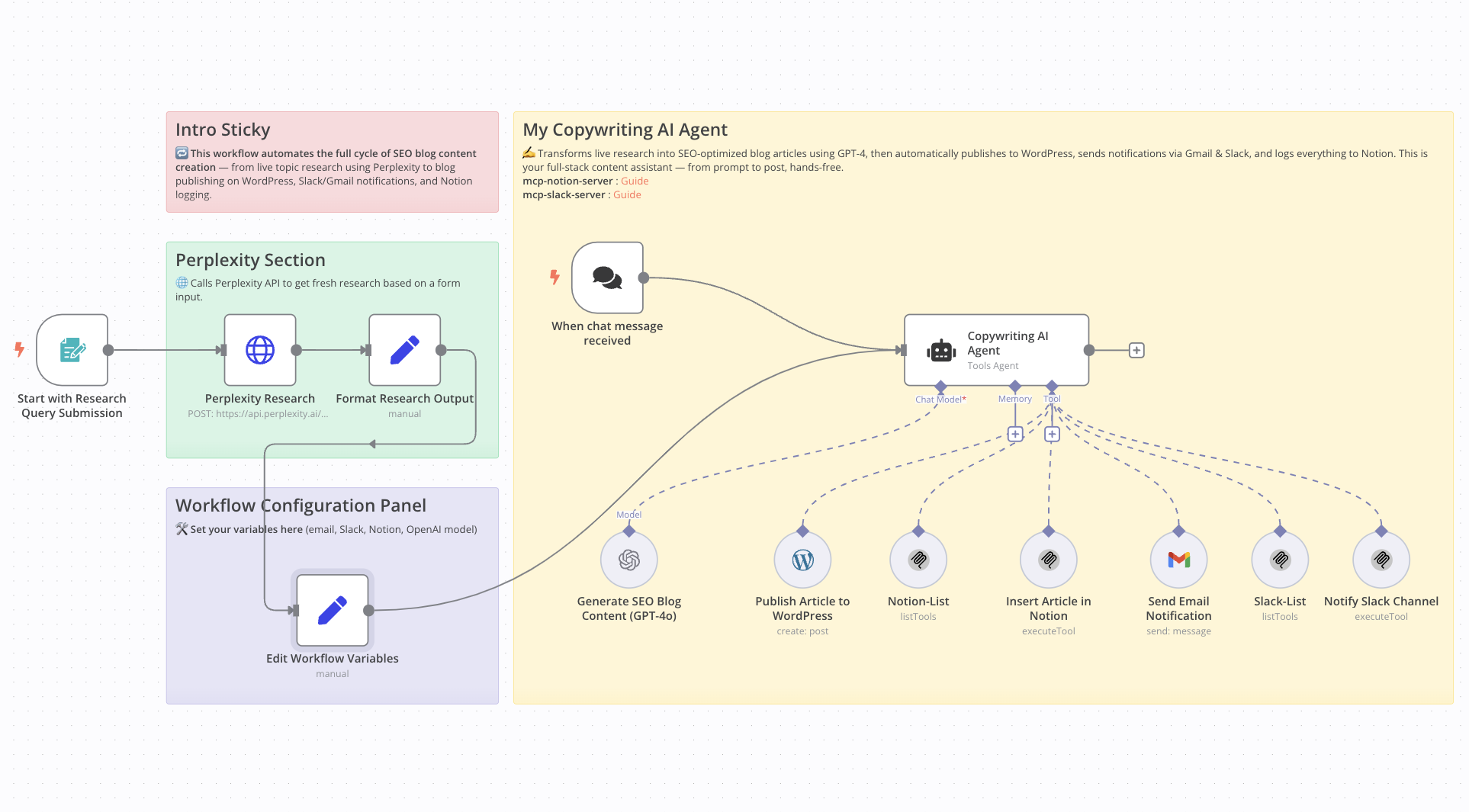
!Workflow Screenshot Who Is This For This workflow is ideal for content creators, solo founders, marketers, and AI enthusiasts who want to automate the full ...
🔌 Nodes & Integrations Used (8)
📖 Implementation & Setup Guide
Who Is This For
This workflow is ideal for content creators, solo founders, marketers, and AI enthusiasts who want to automate the full process of blog content creation. It is especially useful for professionals in tech, AI, and automation who publish frequently and need SEO-ready content fast.
What Problem Does This Workflow Solve
- Creating SEO-optimized blog content is time-consuming and requires consistency.
- Manually researching trending topics slows down the content pipeline.
- Formatting, publishing, and promoting across multiple platforms takes effort.
- This workflow automates the entire process from research to publication.
What This Workflow Does
- Research: Uses Perplexity AI to gather up-to-date content ideas via form input.
- Content Generation: GPT-4 creates a short, SEO-optimized article (max 20 lines) with H1, H2 structure and meta-description.
- Publishing: Automatically posts the content to WordPress.
- Email Notification: Sends the article title and URL via Gmail.
- Slack Notification: Notifies a specified Slack channel when the article is live.
- Database Logging: Saves the article details to a Notion database.
Setup Guide
Prerequisites
- WordPress account with API access
- OpenAI API Key
- Perplexity API Key
- Slack Bot Token
- Notion integration (Database ID)
- Gmail API credentials (optional)
- Community Node Required: This workflow uses `n8n-nodes-mcp`, which only works on self-hosted instances of n8n.
- > To install: Go to *Settings > Community Nodes > Install `n8n-nodes-mcp`*
Steps
- Import the workflow into your n8n instance
- Install the required community node (`n8n-nodes-mcp`)
- Set up API credentials for OpenAI, Perplexity, WordPress, Slack, Gmail, and Notion
- Customize the form trigger with your preferred prompt
- Run a test using a sample topic
How to Customize This Workflow
- Modify the research prompt to match your niche or industry
- Adjust GPT-4 settings for tone, structure, or content length
- Customize Notion fields (e.g., add tags, categories, or labels)
- Add logic for generating or assigning featured images automatically
⚡ How to import this workflow into n8n:
- Click the Direct Download JSON button above to save
Automate_blog_content_creation_with_GPT_4_Perplexity_WordPres.json. - Log in to your n8n Cloud or self-hosted n8n instance.
- In your workflow canvas, click the menu in top-right and select Import from File (or paste the JSON directly).
- Configure your credentials (e.g. API keys, database URLs) in the corresponding node settings.
- Click Execute Workflow to test and switch to Active!
Related AI Agents Workflows
View All in AI Agents →5 ways to process images PDFs with Gemini AI in n8n
How it works Many users have asked in the support forum about different methods to analyze images and PDF documents with Google Gemini AI in n8n. This workfl...
7 AI Sales Assistant
Production-ready n8n automation template for 7 AI Sales Assistant built by AhiXLight. Seamlessly connects Airtop Tool, Slack, Airtop with 24 configured nodes.
AAVE portfolio professional AI agent Telegram Email GPT 4o
A next-generation AI-powered DeFi health monitor that tracks wallet positions across Aave V3 using GPT-4o and LangChain. It delivers human-readable reports v...
Access control for AI agents RBAC using Airtable and Telegram
Purpose This workflow allows granular control over the access to tools connected to AI Agents (including Multi-Agent setups) using Role Based Access Control....