Improve your website accessibility with GPT 4o and Google S
Tags: Accessibility, SEO, Blogging, Marketing, Automation, AI, Web Auditing Context Hey! I’m Samir, a Supply Chain Engineer and Data Scientist from Paris, an...
🔌 Nodes & Integrations Used (4)
📖 Implementation & Setup Guide
*Tags: Accessibility, SEO, Blogging, Marketing, Automation, AI, Web Auditing*
Context
Hey! I’m [Samir](https://samirsaci.com), a Supply Chain Engineer and Data Scientist from Paris, and the founder of [LogiGreen Consulting](https://logi-green.com).
In my personal blog, I share insights on how to use **AI, automation, and data analytics** to improve logistics, operations, and digital sustainability practices.
> Have you heard about accessibility?
In this workflow, I use n8n to improve the quality of alternative texts for images **on my personal website.**
📬 For business inquiries, you can connect with me on [LinkedIn](https://www.linkedin.com/in/samir-saci)
Who is this template for?
This workflow is for: - **Bloggers** and **website owners** who want to **improve accessibility** - **SEO professionals** looking to boost page performance - **Web developers** and **product teams** automating web audits
What does it do?
This n8n workflow: 1. 🔍 Downloads the HTML of a blog or web page 2. 🖼️ Extracts all `<img>` tags and their `alt` attributes 3. 📉 Detects missing or too-short alt texts 4. 🤖 Sends those images to **GPT-4o (with vision)** to generate new alt descriptions 5. 📄 Saves the results into a **Google Sheet**, updating the alt text when needed
How it works
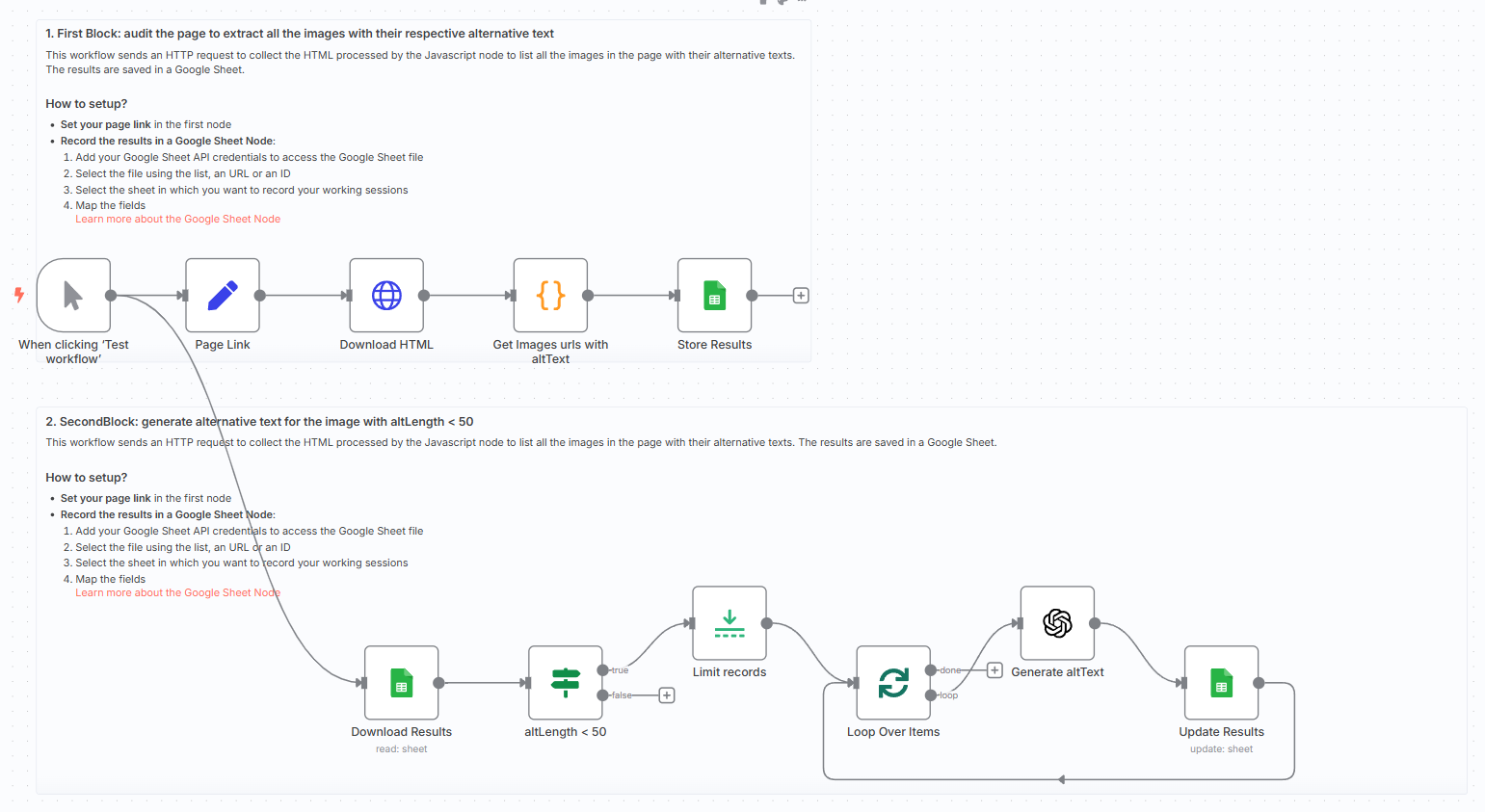
- **Set a page URL** using the `Set` node
- **Download HTML** content
- **Extract image `src` and `alt`** using a `Code` node
- **Store results** in a Google Sheet
- **Filter images** with `altLength < 50`
- **Send image URL** to GPT-4o
- **Update the Google Sheet** with the newly generated `newAlt` text
The AI alt texts are concise, descriptive, and accessibility-compliant.
What do I need to get started?
You’ll need: - A **Google Sheet** to store the audit results - An **OpenAI account with GPT-4o access**
Follow the Guide! Follow the sticky notes in the workflow or check my tutorial to configure each node and start using AI to **improve the accessibility of your website.**
[](https://www.youtube.com/watch?v=LwTIro6Rapk)
🎥 [Watch My Tutorial](https://www.youtube.com/watch?v=LwTIro6Rapk)
Notes
- GPT-generated alt texts are limited to ~125–150 characters for best results
- Use this to comply with **WCAG** and improve Google indexing
- Easily adapt it to audit multiple domains or e-commerce catalogues
*This workflow was built using n8n version 1.85.4* *Submitted: April 21, 2025*
⚡ How to import this workflow into n8n:
- Click the Direct Download JSON button above to save
_Improve_your_website_accessibility_with_GPT_4o_and_Google_S.json. - Log in to your n8n Cloud or self-hosted n8n instance.
- In your workflow canvas, click the menu in top-right and select Import from File (or paste the JSON directly).
- Configure your credentials (e.g. API keys, database URLs) in the corresponding node settings.
- Click Execute Workflow to test and switch to Active!
Related DevOps & GitHub Workflows
View All in DevOps & GitHub →Generate Google Doc Proposal
Production-ready n8n automation template for Generate Google Doc Proposal built by AhiXLight. Seamlessly connects Execute Workflow Trigger, Google Drive, OpenAI with 7 configured nodes.
Add a new lead to Pipedrive once GitHub repo is forked
This workflow automatically adds a new lead to Pipedrive once someone forks your GitHub repository. Prerequisites - Pipedrive account and Pipedrive credentia...
Add the affiliate to a program automatically
This workflow allows you to create an affiliate, add metadata, and add the affiliate to a program. !workflow-screenshot Tapfiliate node: This node allows you...
Add a note to Pipedrive s contact once PR is added on GitHub
This workflow automatically adds a note of the PR from GitHub to the Pipedrive contact if their GitHub email matches a Person in Pipedrive. Prerequisites - P...