Automate photo background removal with Photoroom API and Goog
Tags: Marketing, Image Processing, Automation Context Hey! I’m Samir , a Data Scientist from Paris and the founder of LogiGreen Consulting. We use AI, automa...
🔌 Nodes & Integrations Used (2)
📖 Implementation & Setup Guide
*Tags: Marketing, Image Processing, Automation*
Context
Hey! I’m [Samir](https://samirsaci.com) , a Data Scientist from Paris and the founder of [LogiGreen Consulting](https://logi-green.com).
We use **AI, automation, and data** to support sustainable business practices for small, medium and large companies.
I implemented this workflow to support an event agency to automate **image processing like background removal** using Photoroom API.
[](https://www.youtube.com/watch?v=gBn9wd0fJ54)
> Automate your photos processing with n8n!
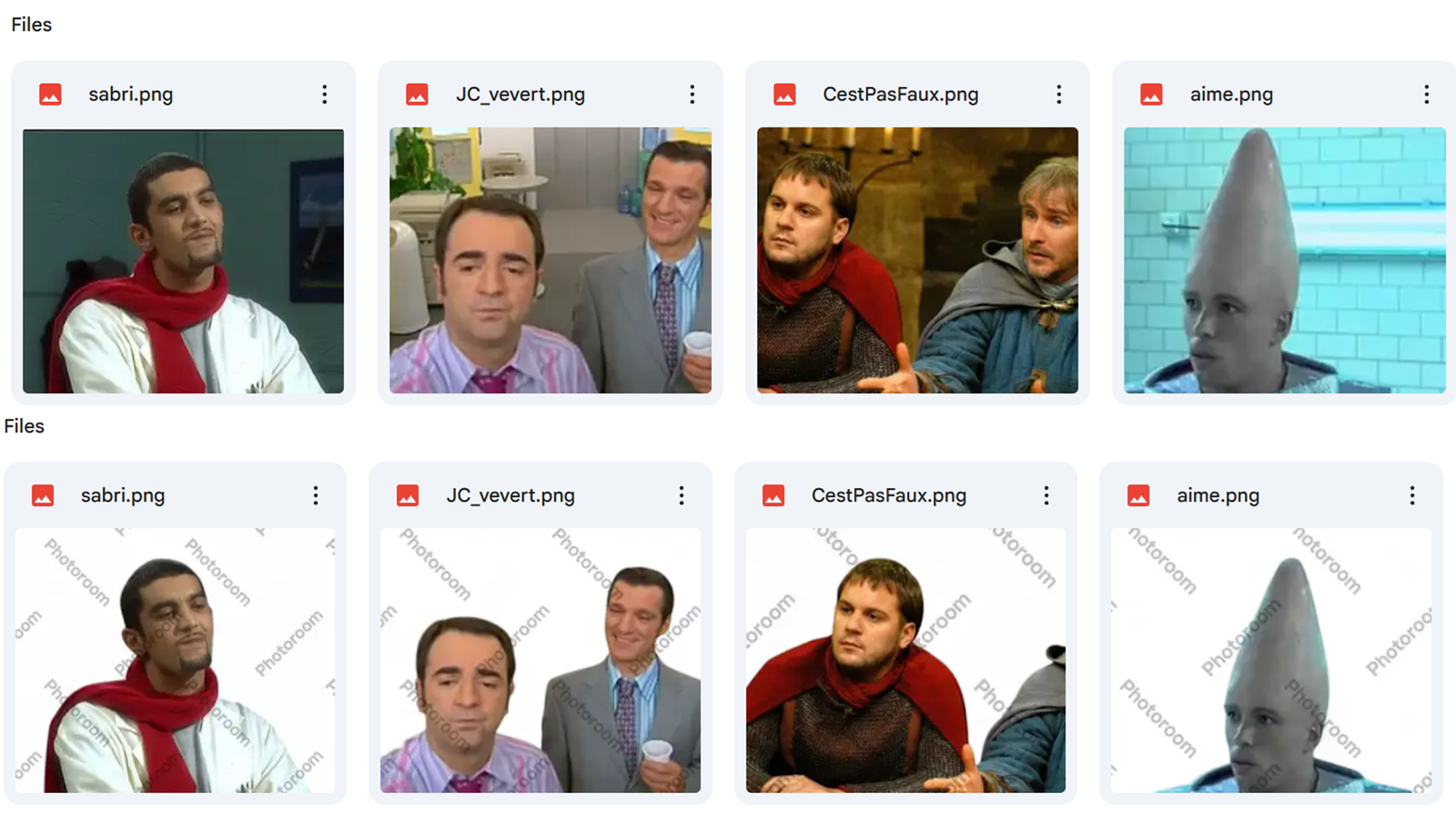
This n8n workflow collects all images in a **Google Drive** folder shared with multiple photographers.
For each image, it calls the **Photoroom API**: - A processed image w/o a background is saved in a subfolder **Remove Background** - The original pictures are saved in the subfolder **Original**
This workflow, triggered every morning, will **process the backlog of images**.
[](https://www.youtube.com/watch?v=gBn9wd0fJ54)
📬 For business inquiries, feel free to connect with me on [LinkedIn](https://www.linkedin.com/in/samir-saci)
Who is this template for?
This workflow is useful for: - **Digital Marketing** teams that use images for content creation - **Photographs** or **Event Organisers** that collect large amounts of photos that need processing
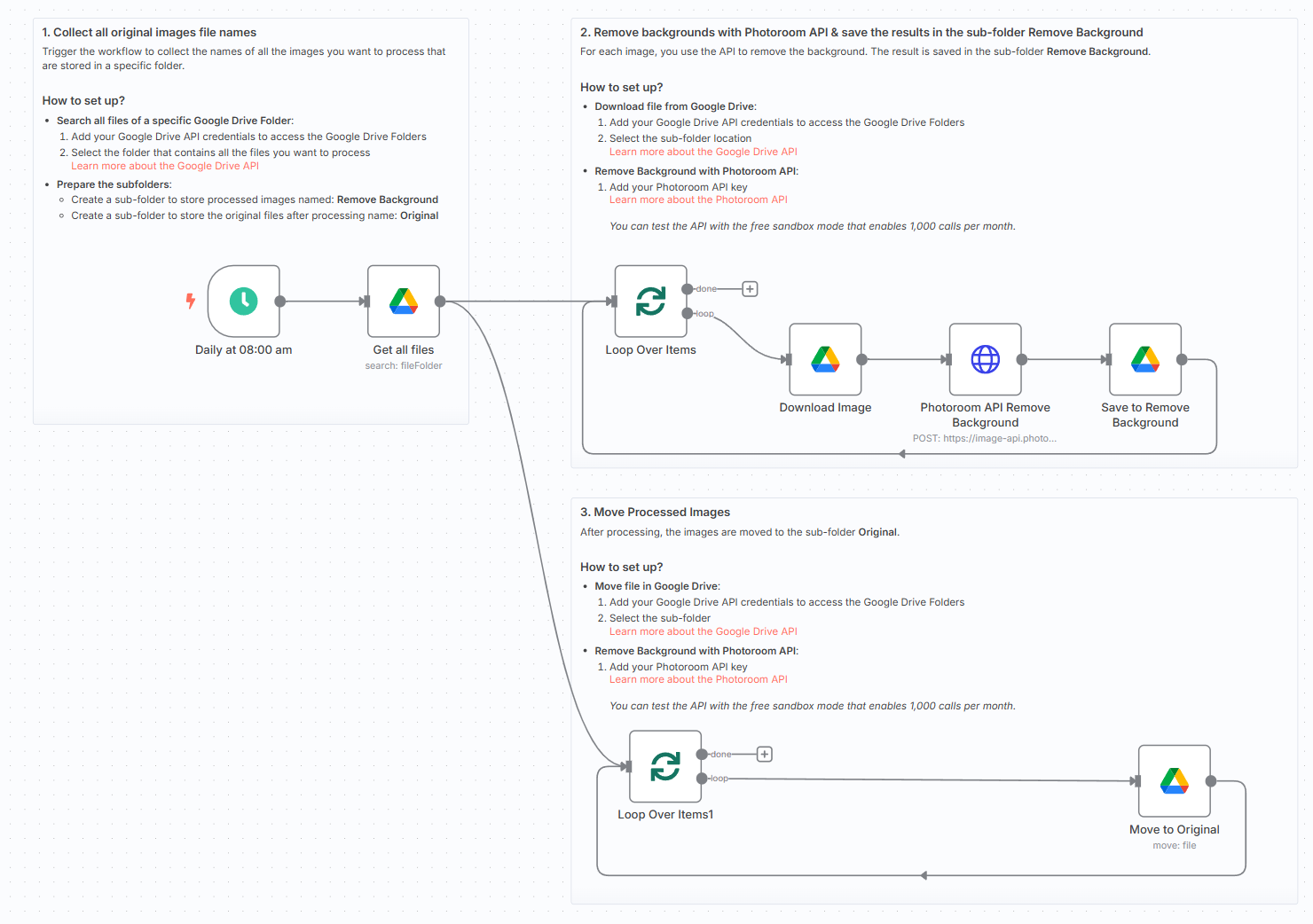
What does it do?
This n8n workflow: 1. ⏰ Triggers automatically every morning 2. 🖼️ Collects the names and IDs of all images in the folder 3. 🧹 HTTP POST request to Photoroom API to remove the background 4. 📄 Stores the processed image and the original image in two separate sub-folders
[](https://www.youtube.com/watch?v=gBn9wd0fJ54)
What do I need to get started?
You’ll need: - A **Google Drive Account** connected to your n8n instance with credentials - A **Photoroom API** key that you can get for free (trial) here: [Photoroom API](https://docs.photoroom.com/)
Follow the Guide!
Follow the **sticky notes** inside the workflow or check out my step-by-step tutorial on how to configure and deploy it.
[](https://www.youtube.com/watch?v=gBn9wd0fJ54)
🎥 [Watch My Tutorial](https://www.youtube.com/watch?v=gBn9wd0fJ54)
*This workflow was built using n8n version 1.93.0* *Submitted: May 26, 2025*
⚡ How to import this workflow into n8n:
- Click the Direct Download JSON button above to save
_Automate_photo_background_removal_with_Photoroom_API_and_Goog.json. - Log in to your n8n Cloud or self-hosted n8n instance.
- In your workflow canvas, click the menu in top-right and select Import from File (or paste the JSON directly).
- Configure your credentials (e.g. API keys, database URLs) in the corresponding node settings.
- Click Execute Workflow to test and switch to Active!
Related General Automation Workflows
View All in General Automation →Generate Application Copy
Production-ready n8n automation template for Generate Application Copy built by AhiXLight. Seamlessly connects Execute Workflow Trigger, OpenAI with 4 configured nodes.
2-way sync Google Contacts and Notion
Sync your Google Contacts with your Notion database. You can filter contacts by label or sync all contacts. All contact information is kept in sync between G...
2D Image to 3D Model Automation
Production-ready n8n automation template for 2D Image to 3D Model Automation built by AhiXLight. Seamlessly connects HTTP Request, Google Sheets, Google Drive with 17 configured nodes.
2 way sync assignments completion between Canvas LMS and Notion
Syncs assignments and completion states to and fro between Canvas LMS and a Notion database. Automatically triggers every 2 hours during the schoolday by def...