Automate currency rates update in invoices with Google Sheet
Tags: Automation, Finance, Google Sheets, API Note: This workflow uses the Exchange rate API and requires a valid API key. Context I’m Samir Saci, a Supply C...
🔌 Nodes & Integrations Used (2)
📖 Implementation & Setup Guide
*Tags: Automation, Finance, Google Sheets, API*
*Note: This workflow uses the Exchange rate API and requires a valid API key.*
Context I’m [Samir Saci](https://samirsaci.com), a **Supply Chain Data Scientist** who builds automations to streamline operations, reduce manual tasks, and boost decision-making through real-time data.
In this workflow, I automated the task of **fetching live currency exchange rates**, updating a **Google Sheet** with the latest values, and **archiving historical records** — all without writing any code.
> Improve your productivity by automating admin tasks with n8n!
📬 For business inquiries, you can add me on [LinkedIn](https://www.linkedin.com/in/samir-saci)
Who is this template for? This template is perfect for: - **Finance teams** tracking multi-currency cashflows - **Analysts** building dashboards or models requiring updated FX data - **Anyone working with spreadsheets** who needs up-to-date exchange rates
It updates: - A live sheet with the latest USD-based exchange rates - An archive tab to track historical changes over time
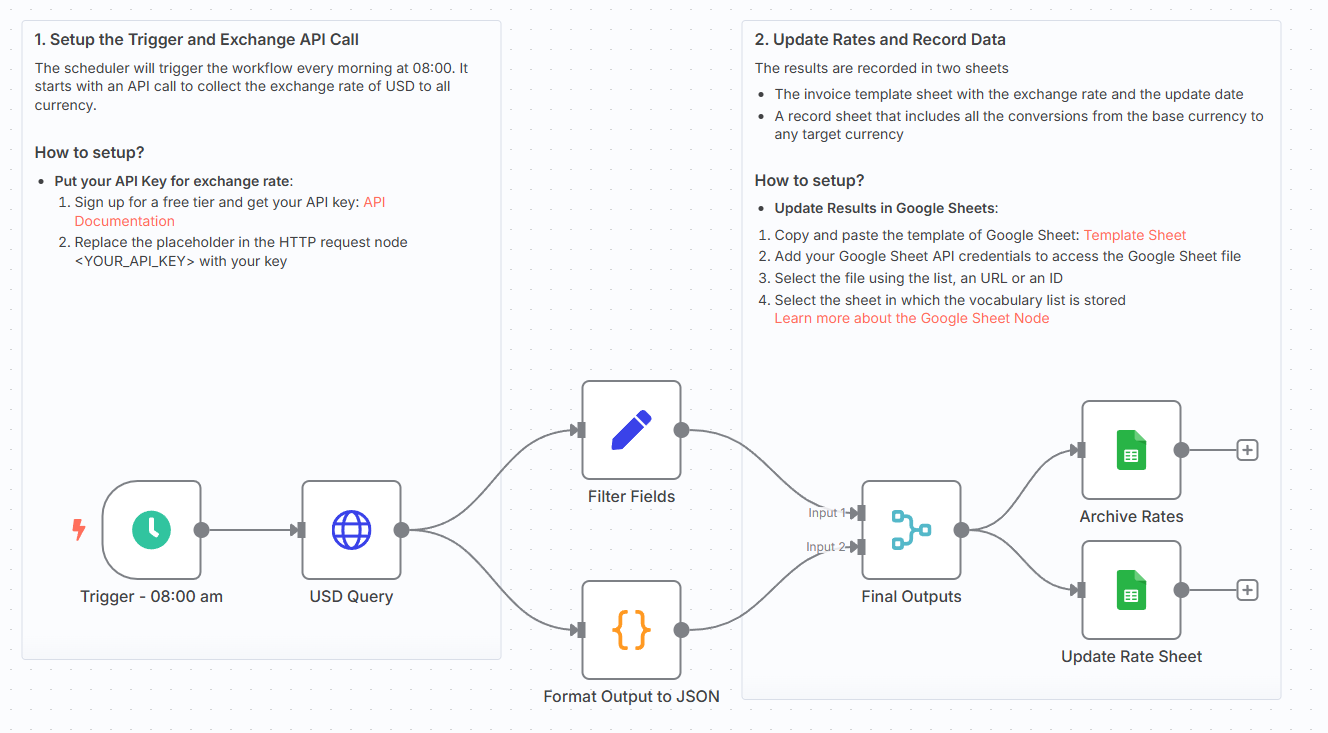
How does it work? This workflow runs in N8N and performs the following steps:
- 🌐 **Calls the ExchangeRate API** to get the latest rates based on USD
- 🧠 **Extracts and formats key fields**: base currency, timestamp, and conversion values
- 📊 **Updates a main Google Sheet** with the latest data (using upsert logic)
- 🗂️ **Appends all rates** to a second Google Sheet tab for historical tracking
You can schedule this workflow to run daily, hourly, or on-demand.
What do I need to start? You don’t need to write a single line of code. #### Prerequisites: - A **Google Sheet** with two tabs: `Rate Sheet` and `Archives` *(Link of the publicly available example in the template)* - A **valid Exchangerate API key** - **Google Sheets API** connected via OAuth2
Next Steps Use the sticky notes in the workflow to understand how to: - Add your Exchangerate API key - Map the fields to match your Google Sheet layout - Schedule the run frequency using the **Cron node** - Optionally add Slack or email alerts if the base rate changes
For more information, check my tutorial:
[](https://www.youtube.com/watch?v=Lhi6hV6rWEo)
[🎥 Watch My Tutorial](https://www.youtube.com/watch?v=Lhi6hV6rWEo)
🚀 Want to build finance automation workflows like this? 📬 Let’s connect on [LinkedIn](https://www.linkedin.com/in/samir-saci)
Notes - You can adapt this template for **other currencies** by changing the API endpoint
*This workflow was built using **n8n 1.85.4** Submitted: April 15th, 2025*
⚡ How to import this workflow into n8n:
- Click the Direct Download JSON button above to save
_Automate_currency_rates_update_in_invoices_with_Google_Sheet_.json. - Log in to your n8n Cloud or self-hosted n8n instance.
- In your workflow canvas, click the menu in top-right and select Import from File (or paste the JSON directly).
- Configure your credentials (e.g. API keys, database URLs) in the corresponding node settings.
- Click Execute Workflow to test and switch to Active!
Related Voice & Audio Workflows
View All in Voice & Audio →AI Voice Chat with OpenAI, Gemini ElevenLabs
Production-ready n8n automation template for AI Voice Chat with OpenAI, Gemini ElevenLabs built by AhiXLight. Seamlessly connects Memory Manager, Memory Buffer Window, Lm Chat Google Gemini with 15 configured nodes.
AI-Powered Telegram Voice Message Translator
Production-ready n8n automation template for AI-Powered Telegram Voice Message Translator built by AhiXLight. Seamlessly connects Telegram Trigger, Telegram, Lm Chat Open Ai with 13 configured nodes.
Airtable to telli AI Voice Call Automation
Production-ready n8n automation template for Airtable to telli AI Voice Call Automation built by AhiXLight. Seamlessly connects Airtable Trigger, HTTP Request with 7 configured nodes.
AI voice chat using webhook Memory Manager OpenAI Google Gemi
Who is this for? This workflow is designed for businesses or developers looking to integrate voice-based chat applications with dynamic responses and convers...