AI agent to create Linkedin posts for blog promotion with GPT
Tags: Automation, AI, Marketing, Content Creation Context I’m a Supply Chain Data Scientist and content creator who writes regularly about data-driven optimi...
🔌 Nodes & Integrations Used (4)
📖 Implementation & Setup Guide
*Tags: Automation, AI, Marketing, Content Creation*
Context I’m a [**Supply Chain Data Scientist**](https://samirsaci.com) and content creator who writes regularly about **data-driven optimization, logistics, and sustainability**. Promoting blog articles on LinkedIn used to be a manual task — until I decided to **automate it with N8N and GPT-4o**.
This workflow lets you **automatically extract blog posts**, clean the content, and generate a **professional LinkedIn post** using an **AI Agent powered by GPT-4o** — all in one seamless automation.
>Save hours of repetitive work and boost your reach with AI.
📬 For business inquiries, you can add me on [LinkedIn](https://www.linkedin.com/in/samir-saci)
Who is this template for? This template is perfect for: - **Bloggers and writers** who want to promote their content on LinkedIn - **Marketing teams** looking to automate professional post-generation - **Content creators** using Ghost platforms
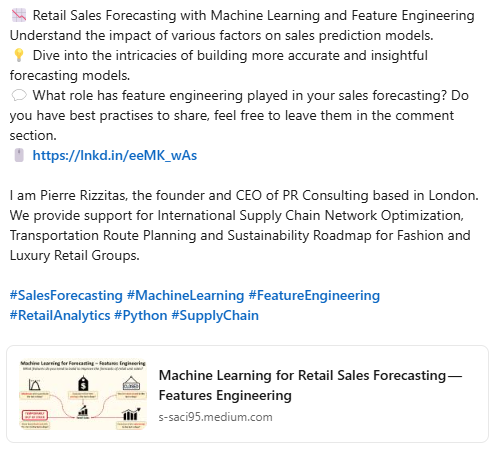
It generates polished LinkedIn posts with: - A hook - A quick summary - A call-to-action - A signature to drive readers to your contact page
[](https://www.youtube.com/watch?v=Lhi6hV6rWEo)
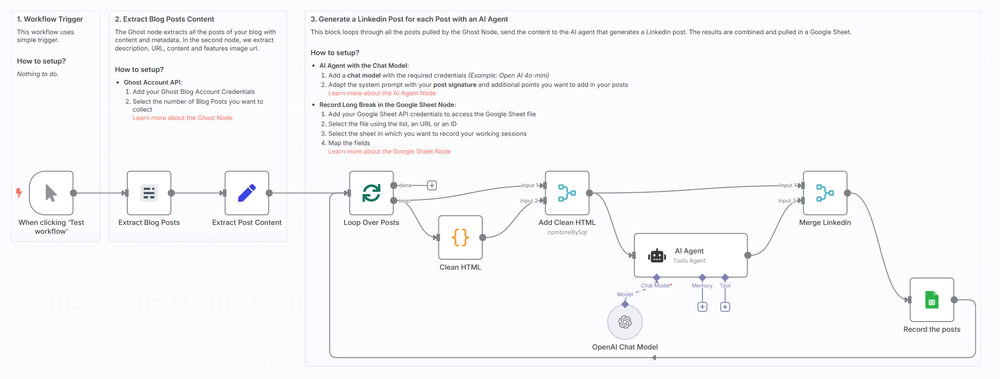
How does it work? This workflow runs in N8N and performs the following steps:
- 🚀 **Triggers manually** or you can add a scheduler
- 📰 **Pulls recent blog posts** from your Ghost site (via API)
- 🧼 **Cleans the HTML** content for AI input
- 🤖 **Sends content to GPT-4o** with a tailored prompt to create a LinkedIn post
- 📄 **Records all data** (post content + LinkedIn output) in a Google Sheet
[](https://www.youtube.com/watch?v=Lhi6hV6rWEo)
What do I need to start? You don’t need to write a single line of code. #### Prerequisites: - A **Ghost CMS account** with blog content - A **Google Sheet** to store generated posts - An **OpenAI API Key** - **Google Sheets API** connected via OAuth2
Next Steps Use the sticky notes in the workflow to understand how to: - Add your Ghost API credentials - Link your Google Sheet - Customize the AI prompt (e.g., change the author name or tone) - Optionally add auto-posting to LinkedIn using tools like Buffer or Make
[](https://www.youtube.com/watch?v=Lhi6hV6rWEo)
[🎥 Watch My Tutorial](https://www.youtube.com/watch?v=Lhi6hV6rWEo)
🚀 Want to explore how automation can scale your brand or business? 📬 Let’s connect on [LinkedIn](https://www.linkedin.com/in/samir-saci)
Notes - You can adapt this template for **Twitter, Facebook**, or even **email newsletters** by adjusting the prompt and output channel. - This workflow was built using **n8n 1.85.4**
Submitted: April 9th, 2025
⚡ How to import this workflow into n8n:
- Click the Direct Download JSON button above to save
_AI_agent_to_create_Linkedin_posts_for_blog_promotion_with_GPT.json. - Log in to your n8n Cloud or self-hosted n8n instance.
- In your workflow canvas, click the menu in top-right and select Import from File (or paste the JSON directly).
- Configure your credentials (e.g. API keys, database URLs) in the corresponding node settings.
- Click Execute Workflow to test and switch to Active!
Related AI Agents Workflows
View All in AI Agents →5 ways to process images PDFs with Gemini AI in n8n
How it works Many users have asked in the support forum about different methods to analyze images and PDF documents with Google Gemini AI in n8n. This workfl...
7 AI Sales Assistant
Production-ready n8n automation template for 7 AI Sales Assistant built by AhiXLight. Seamlessly connects Airtop Tool, Slack, Airtop with 24 configured nodes.
AAVE portfolio professional AI agent Telegram Email GPT 4o
A next-generation AI-powered DeFi health monitor that tracks wallet positions across Aave V3 using GPT-4o and LangChain. It delivers human-readable reports v...
Access control for AI agents RBAC using Airtable and Telegram
Purpose This workflow allows granular control over the access to tools connected to AI Agents (including Multi-Agent setups) using Role Based Access Control....