Generate auto post social videos to multiple platforms with GP
!Workflow Screenshot AI-Powered Social Video Generator with Auto-Posting to Instagram, TikTok, YouTube, Facebook, LinkedIn, Threads, Pinterest, Twitter (X), ...
🔌 Nodes & Integrations Used (7)
📖 Implementation & Setup Guide
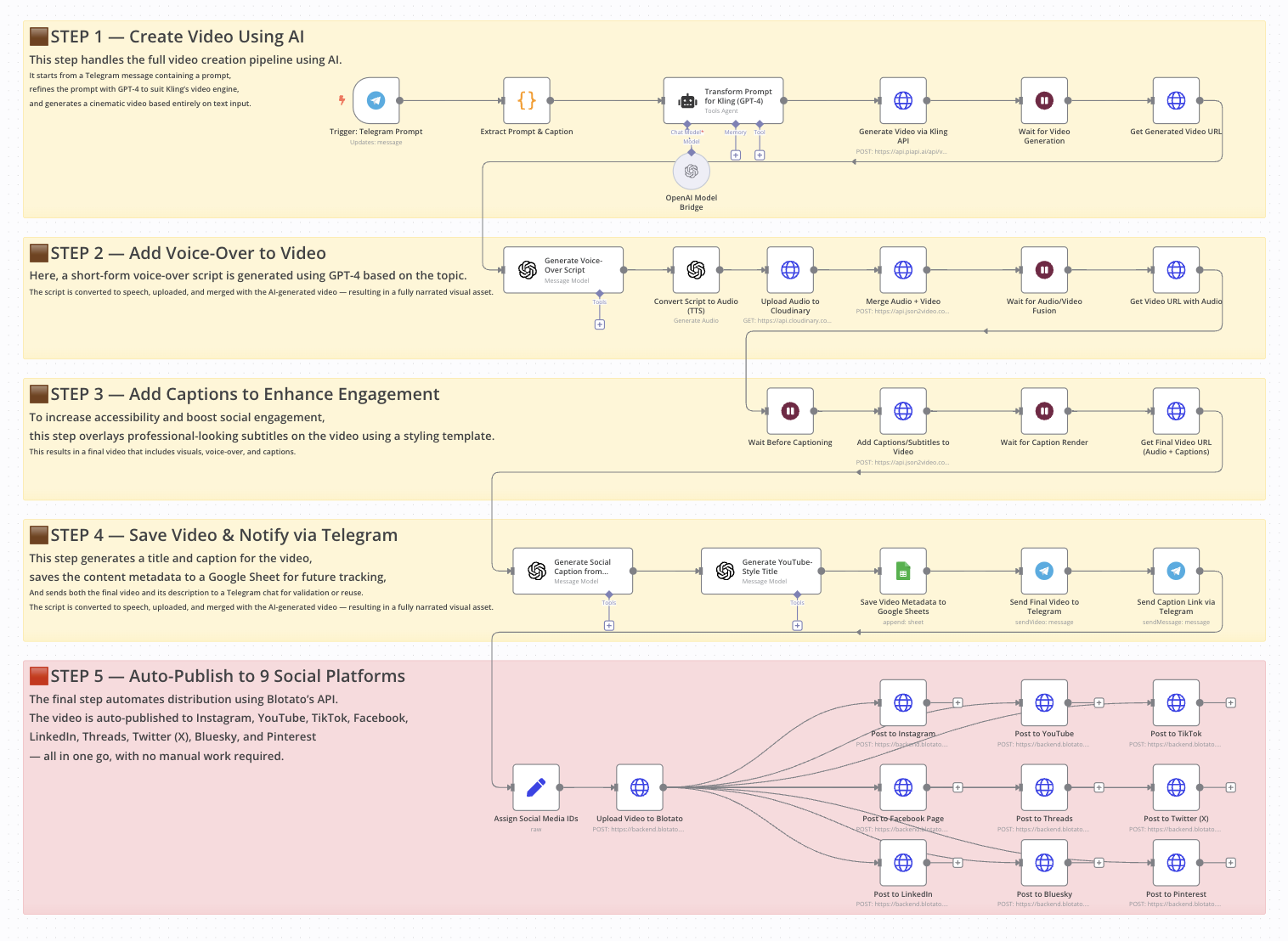
AI-Powered Social Video Generator with Auto-Posting to Instagram, TikTok, YouTube, Facebook, LinkedIn, Threads, Pinterest, Twitter (X), and Bluesky
Who is this workflow for?
This workflow is ideal for content creators, marketers, social media managers, and automation enthusiasts who want to generate, customize, and publish short-form videos across multiple platforms without manual editing or posting. If you use tools like ChatGPT, Kling, or Blotato and want to streamline your content creation process, this workflow is made for you.
What problem does this workflow solve?
Publishing regular video content on multiple platforms is time-consuming—especially when adding voice-overs, captions, and managing distribution. This workflow solves that by:
- Automating video generation using AI (Kling + GPT-4)
- Adding realistic voice narration
- Styling subtitles for social media
- Creating titles and social captions
- Auto-posting to Instagram, TikTok, YouTube, Facebook, Threads, Twitter (X), LinkedIn, Pinterest, and Bluesky
All of this is triggered by a simple message sent via Telegram.
How the workflow works
This end-to-end automation transforms a short Telegram message into a fully produced and published social video:
- Receives a text prompt from Telegram
- Transforms it into a detailed video scene using GPT-4
- Generates a cinematic video with Kling
- Creates a voice-over script and converts it to audio
- Merges the video and the audio
- Adds styled captions
- Writes a social caption and an SEO-optimized title
- Saves metadata to Google Sheets
- Sends a preview via Telegram
- Publishes the video to 9 social platforms using Blotato
Setup
- Connect your Telegram bot to the "Telegram Trigger" node
- Add your OpenAI API key to all GPT-related nodes
- Configure Kling API access in the "Generate Video" node
- Link your Cloudinary account for audio upload
- Connect JSON2Video to handle video merging and captioning
- Set up Google Sheets with your preferred spreadsheet ID
- Connect your Blotato API key and fill in the platform IDs (Instagram, TikTok, etc.)
- Test by sending a Telegram message like:
- `generate video A robot exploring Mars, Why AI will reshape humanity`
- > **Disclaimer:** This workflow uses Community Nodes, which are only available on self-hosted instances of n8n.
How to customize this workflow to your needs
- **Change the visual style**: Adjust the GPT-4 prompt formatting to reflect your brand tone
- **Edit voice style**: Replace the TTS provider or tweak OpenAI's voice settings
- **Revise captions or titles**: Fine-tune the system prompts in the "Create Description" or "Create Title" nodes
- **Target fewer platforms**: Disable or remove nodes for platforms you don’t use
- **Add approval steps**: Insert a Telegram confirmation step before auto-publishing
📄 **Documentation**: [Notion Guide](https://automatisation.notion.site/AI-powered-social-video-creation-and-auto-posting-to-Instagram-TikTok-LinkedIn-more-1cf3d6550fd98038a91edbdd3022d37f?pvs=4)
Demo Video
🎥 Watch the full tutorial here: [YouTube Demo](https://youtu.be/lpfe0joyNL4)
⚡ How to import this workflow into n8n:
- Click the Direct Download JSON button above to save
Generate_auto_post_social_videos_to_multiple_platforms_with_GP.json. - Log in to your n8n Cloud or self-hosted n8n instance.
- In your workflow canvas, click the menu in top-right and select Import from File (or paste the JSON directly).
- Configure your credentials (e.g. API keys, database URLs) in the corresponding node settings.
- Click Execute Workflow to test and switch to Active!
Related AI Agents Workflows
View All in AI Agents →5 ways to process images PDFs with Gemini AI in n8n
How it works Many users have asked in the support forum about different methods to analyze images and PDF documents with Google Gemini AI in n8n. This workfl...
7 AI Sales Assistant
Production-ready n8n automation template for 7 AI Sales Assistant built by AhiXLight. Seamlessly connects Airtop Tool, Slack, Airtop with 24 configured nodes.
AAVE portfolio professional AI agent Telegram Email GPT 4o
A next-generation AI-powered DeFi health monitor that tracks wallet positions across Aave V3 using GPT-4o and LangChain. It delivers human-readable reports v...
Access control for AI agents RBAC using Airtable and Telegram
Purpose This workflow allows granular control over the access to tools connected to AI Agents (including Multi-Agent setups) using Role Based Access Control....