Find Content Gaps in Competitors Websites with InfraNodus Graph
This template can be used to find the content gaps in your competitors' discourse: identifying the topics they are not yet connecting and giving you an oppor...
🔌 Nodes & Integrations Used (6)
📖 Implementation & Setup Guide
This template can be used to **find the content gaps in your competitors' discourse**: identifying the topics they are not yet connecting and giving you an opportunity to fill in this gap with your content and product ideas. It will also generate **research questions** that will help bridge the gaps and generate new ideas.
The template showcases the use of multiple n8n nodes and processes: - enriching Google sheets file with the new data - data extraction - content enhancement using GraphRAG approach - content gap / research question generation
This approach can be very useful for research, marketing, and SEO applications as you can quickly get an overview of the main topics that are available online for a certain niche and understand what is missing.
What are Content Gaps in Marketing and SEO?
In the context of SEO, content gaps are usually understood as the topics that your competitors rank for but you do not.
However, it's hard to rank for these topics because there's very high competition. So a much more effective way is to identify **the gaps between the topics your competitors are talking about that are not yet bridged in their discourse**.
If you address these gaps in your content, you will increase the **informational gain** that your content offers and also offer a **novel perspective** while touching upon the topics that are relevant in your field.
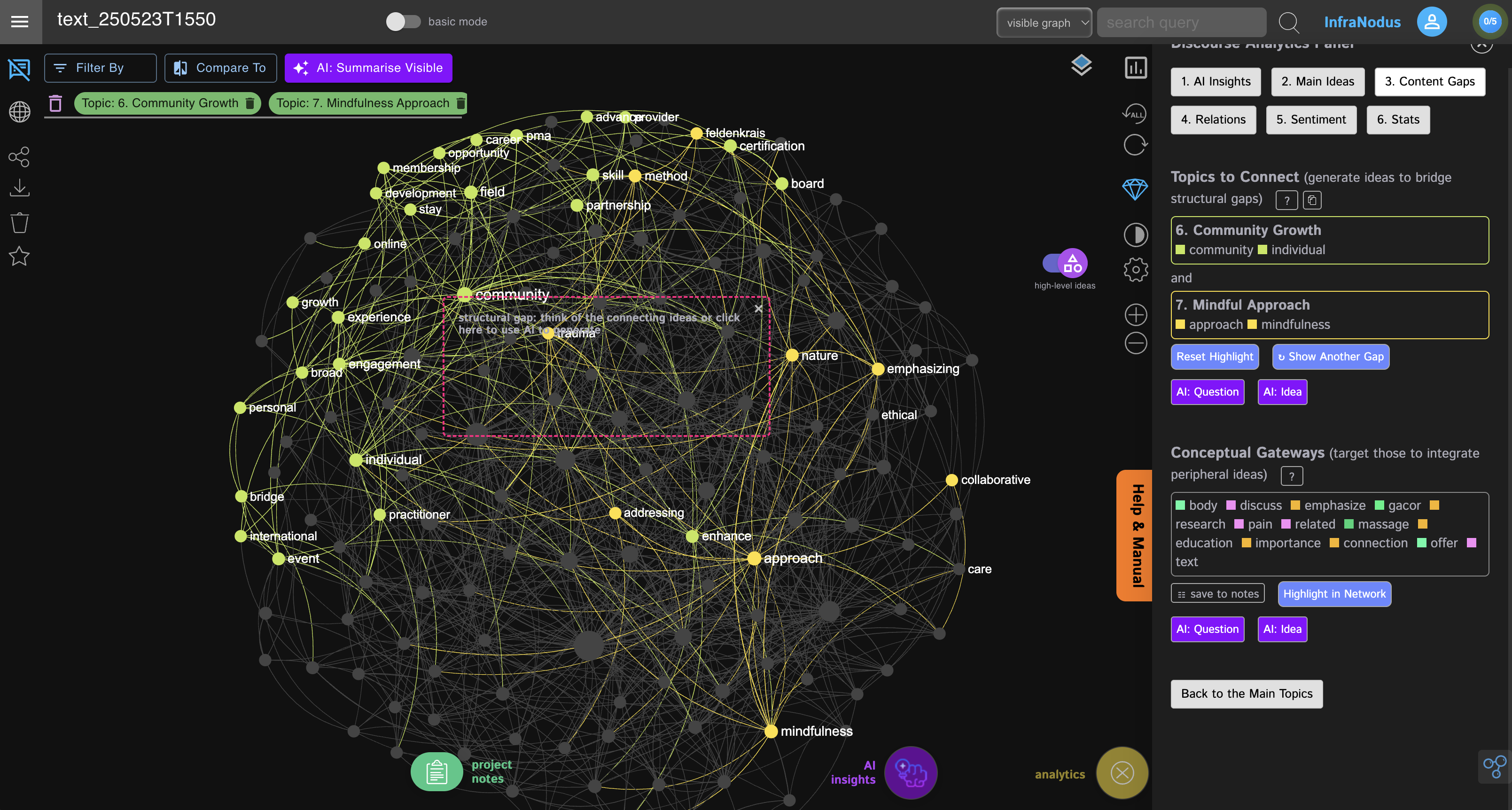
For example, if we analyze the top websites for "body and physical practices, fitness, etc." we will see that most of them are talking about the health and fitness aspects and another big topic is the community aspect.
However, there is a gap between the two topics: which means that most of the websites (companies) that talk about this topic don't mention the two in the same context. This might be an opportunity: bridging the gap between health, fitness but also emphasizing the community aspect that comes with a collective practice.
How it works This template consists of the **two stages**:
1) **Data enrichment** of a Google sheet file with a list of your competitors using InfraNodus' GraphRAG to generate topical summaries and graph summaries for every URL you're analyzing.
2) **Insight generation** (using InfraNodus to identify the main topical clusters and gaps in those summaries, these insights are then added to the Google sheet file.
Additionally, it contains a sub workflow that you can activate and launch to ask Perplexity model to **conduct a market research** and find the companies that operate in your field and populate the original Google sheet file.
Here's a description step by step:
- Step 0: Populate the Google sheets file with the company data (either manually or using the **sub-workflow provided** or Manus AI / Deep Research)
- Steps 1-2: Triggering and Launching the workflow, extracting the company URL from the Google sheet row
- Step 3: Scraping the url content from the companies' websites and cleaning the data
- Steps 5-7: Use [InfraNodus GraphRAG Content Enhancer](https://infranodus.com/docs/graph-rag-knowledge-graph) to get a topical summary and graph summary. This is what you're going to get:
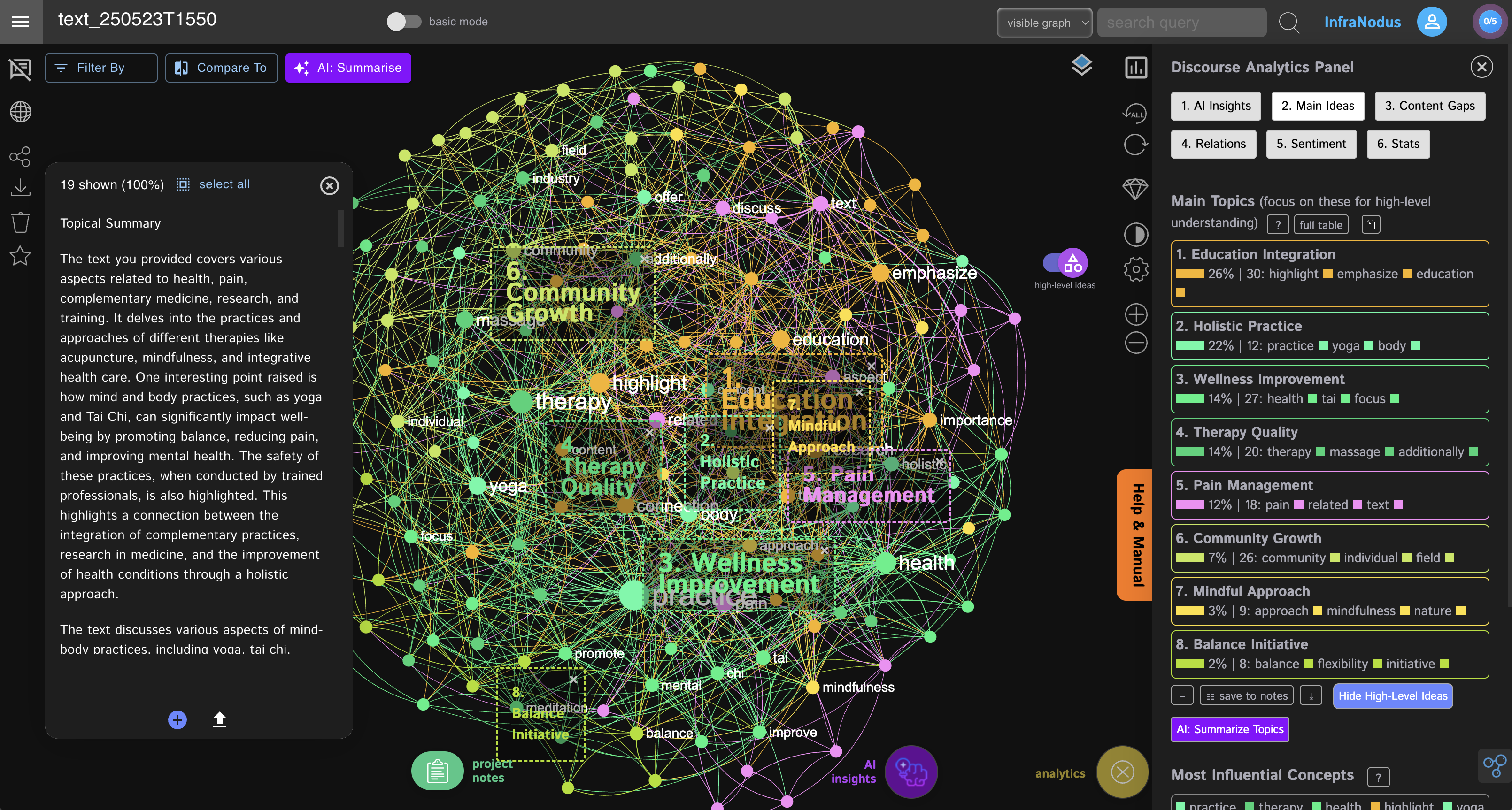
- Steps 8-10: Use InfraNodus AI to generate insight advice and research questions based on the content gaps
How to use
You need an [InfraNodus GraphRAG API account and key](https://infranodus.com/use-case/ai-knowledge-graphs) to use this workflow.
- Create an InfraNodus account
- Get the API key at [https://infranodus.com/api-access](https://infranodus.com/api-access) and create a Bearer authorization key for the InfraNodus HTTP nodes.
- Create a separate knowledge graph for each expert (using PDF / content import options) in InfraNodus
- For each graph, go to the workflow, paste the name of the graph into the `body` `name` field.
- Keep other settings intact or learn more about them at the [InfraNodus access points](https://support.noduslabs.com/hc/en-us/articles/13605983537692-InfraNodus-API-Access-Points) page.
- Once you add one or more graphs as experts to your flow, add the LLM key to the OpenAI node and launch the workflow
Requirements
- An [InfraNodus](https://infranodus.com/use-case/ai-knowledge-graphs) account and API key
- A Google Sheet account and an authorization key
Note: OpenAI key is not required. But you might want to get a Perplexity AI key if you'd like to use the sub-workflow that populates the Google sheet with your competitors' website addresses (if you don't have this list yet).
Customizing this workflow
You can use this same workflow with a Telegram bot or Slack (to be notified of the summaries and ideas).
You can also hook up automated social media content creation workflows in the end of this template, so you can generate posts that are relevant (covering the important topics in your niche) but also novel (because they connect them in a new way).
Check out the **complete guide** at [https://support.noduslabs.com/hc/en-us/articles/20234254556828-Find-Content-Gaps-in-Websites-Market-Research-and-SEO-n8n-Workflow](https://support.noduslabs.com/hc/en-us/articles/20234254556828-Find-Content-Gaps-in-Websites-Market-Research-and-SEO-n8n-Workflow)
Also check the **full tutorial** with a **conceptual explanation** at [https://support.noduslabs.com/hc/en-us/articles/20454382597916-Beat-Your-Competition-Target-Their-Content-Gaps-with-this-n8n-Automation-Workflow](https://support.noduslabs.com/hc/en-us/articles/20454382597916-Beat-Your-Competition-Target-Their-Content-Gaps-with-this-n8n-Automation-Workflow)
Also check out the **video tutorial** with a demo:
[](https://www.youtube.com/watch?v=DZS7LMbFcSU)
For **support and help** with this workflow, please, contact us at [https://support.noduslabs.com](https://support.noduslabs.com)
⚡ How to import this workflow into n8n:
- Click the Direct Download JSON button above to save
Find_Content_Gaps_in_Competitors_Websites_with_InfraNodus_Graph.json. - Log in to your n8n Cloud or self-hosted n8n instance.
- In your workflow canvas, click the menu in top-right and select Import from File (or paste the JSON directly).
- Configure your credentials (e.g. API keys, database URLs) in the corresponding node settings.
- Click Execute Workflow to test and switch to Active!
Related Docs, PDF & OCR Workflows
View All in Docs, PDF & OCR →Add articles to a Notion list by accessing a Discord slash comma
This workflow allows you to add articles to a Notion reading list by accessing a Discord slash command. Prerequisites - A Notion account and [credentials](),...
Adobe PDF Services API Automation
Production-ready n8n automation template for Adobe PDF Services API Automation built by AhiXLight. Seamlessly connects HTTP Request, Execute Workflow Trigger, Dropbox with 20 configured nodes.
Adobe PDF Services API Workflow
Production-ready n8n automation template for Adobe PDF Services API Workflow built by AhiXLight. Seamlessly connects HTTP Request, Execute Workflow Trigger, Dropbox with 20 configured nodes.
AI Brand Voice Content Generator
Production-ready n8n automation template for AI Brand Voice Content Generator built by AhiXLight. Seamlessly connects Lm Chat Open Ai, Information Extractor, HTTP Request with 27 configured nodes.